

Product Introduction

Laser Marking Capabilities
| Material | 20W | 30W | 60W | 100W | 200W | 300W |
|---|---|---|---|---|---|---|
| Stainless Steel (304/316) | Surface Mark; Black/Anneal; Color Marking | Surface Mark; Black/Anneal; Color Marking | Surface Mark; Black/Anneal; Shallow Engrave | Surface Mark; Black/Anneal; Shallow Engrave; Deep Color | Surface Mark; Black/Anneal; Shallow Engrave; Deep Relief | Surface Mark; Black/Anneal; Shallow Engrave; Deep Relief |
| Carbon Steel (Mild) | Surface Mark; Shallow Engrave | Surface Mark; Shallow Engrave | Surface Mark; Shallow Engrave; Deep Engrave | Surface Mark; Shallow Engrave; Deep Engrave | Deep Engrave; High-Contrast Mark | Deep Engrave; High-Contrast Mark |
| Tool Steel (HRC ≤55) | Surface Mark | Surface Mark; Shallow Engrave | Surface Mark; Shallow Engrave | Surface Mark; Shallow Engrave; Deep Engrave | Deep Engrave | Deep Engrave |
| Tool Steel (HRC 55–60) | Surface Mark | Surface Mark | Surface Mark; Shallow Engrave | Surface Mark; Shallow Engrave | Deep Engrave | Deep Engrave |
| Titanium & Ti Alloys | Surface Mark; Black/Anneal (Color Capable) | Surface Mark; Black/Anneal; Color Marking | Surface Mark; Black/Anneal; Color Marking | Surface Mark; Black/Anneal; Color Marking | Surface Mark; Black/Anneal; Deep Color | Surface Mark; Black/Anneal; Deep Color |
| Nickel Alloys / Inconel | Surface Mark | Surface Mark; Shallow Engrave | Surface Mark; Shallow Engrave | Surface Mark; Shallow Engrave | Surface Mark; Deep Engrave | Surface Mark; Deep Engrave |
| Aluminum (Anodized) | Fast Coating Removal (Surface Mark) | Coating Removal; Color Mark | Coating Removal | Coating Removal | Coating Removal | Coating Removal |
| Aluminum (Bare) | Surface Mark (MOPA Color Capable) | Surface Mark; Shallow Engrave (MOPA Color Capable) | Surface Mark; Shallow Engrave | Surface Mark; Shallow Engrave | Deep Engrave; High-Contrast Mark | Deep Engrave; High-Contrast Mark |
| Brass | Surface Mark; High Contrast | Surface Mark; Shallow Engrave | Surface Mark; Shallow Engrave | Surface Mark; Shallow Engrave | Deep Engrave | Deep Engrave |
| Copper | Surface Mark (MOPA Recommended) | Surface Mark; Shallow Engrave (MOPA Recommended) | Surface Mark; Shallow Engrave | Surface Mark; Shallow Engrave | Deep Engrave (Slow) | Deep Engrave (Slow) |
| Galvanized Steel | Surface Mark (Manage Zinc Fumes) | Surface Mark | Surface Mark | Surface Mark | Surface Mark | Surface Mark |
| Zinc-/Chrome-Plated Steel | Coating Ablation (Surface Mark) | Coating Ablation | Coating Ablation | Coating Ablation | Coating Ablation | Coating Ablation |
| Black Oxide/Phosphate Coat | Surface Mark; Black/Anneal | Surface Mark; Black/Anneal | Surface Mark; Black/Anneal | Surface Mark; Black/Anneal | Surface Mark; Black/Anneal | Surface Mark; Black/Anneal |
| Painted/Powder-Coated Metals | Coating Ablation (Surface Mark) | Coating Ablation | Coating Ablation | Coating Ablation | Coating Ablation | Coating Ablation |
| Hard Plastics (ABS/PC/PA) | Surface Mark (MOPA; Laser-Markable Grades) | Surface Mark (MOPA; Laser-Markable Grades) | Surface Mark (MOPA; Laser-Markable Grades) | Surface Mark (MOPA; Laser-Markable Grades) | Deep Mark (Laser-Grade) | Deep Mark (Laser-Grade) |
| POM/PE/PP (Additive-Filled) | Surface Mark (Additive-Filled; MOPA Recommended) | Surface Mark (Additive-Filled; MOPA Recommended) | Surface Mark (Additive-Filled) | Surface Mark (Additive-Filled) | Surface Mark (Additive-Filled) | Surface Mark (Additive-Filled) |
| CFRP/GFRP Composites | Resin Surface Mark | Resin Surface Mark | Resin Surface Mark | Resin Surface Mark | Deep Surface Mark | Deep Surface Mark |
| Ceramics (With Marking Paste) | Shallow Engrave (With Paste) | Shallow Engrave (With Paste) | Shallow Engrave; Surface Mark (With Paste) | Shallow Engrave; Surface Mark (With Paste) | Deep Engrave (With Paste) | Deep Engrave (With Paste) |
| Glass (With Marking Paste) | Shallow Engrave (With Paste) | Shallow Engrave (With Paste) | Shallow Engrave; Surface Mark (With Paste) | Shallow Engrave; Surface Mark (With Paste) | Deep Engrave (With Paste) | Deep Engrave (With Paste) |
| Wood/Leather (Organics) | Not Recommended (use CO₂ laser) | Not Recommended | Not Recommended | Not Recommended | Not Recommended | Not Recommended |
| PVC | Not Recommended (toxic fumes) | Not Recommended | Not Recommended | Not Recommended | Not Recommended | Not Recommended |
Compatible Materials
- Stainless Steel
- Aluminum
- Anodized Aluminum
- Brass
- Copper
- Bronze
- Titanium
- Tungsten
- Carbide
- Zinc
- Chrome
- Nickel
- Nickel Alloys
- Silver
- Gold
- Platinum
- Palladium
- Iron
- Carbon Steel
- Galvanized Steel
- Magnesium
- Cobalt
- Inconel
- Hard Alloys
- Painted Metals
- Powder-Coated Metals
- Stainless Steel with Mirror Finish
- Plastics
- Polycarbonate
- PEEK
- PET
- Acrylic
- Nylon
- Polypropylene
- Silicone
- Epoxy Resin
- Coated Glass
- Ceramic
- Leather
- Wood
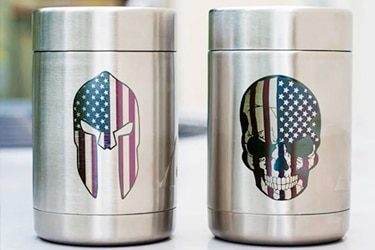
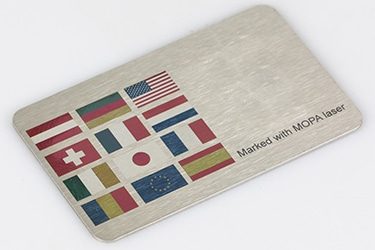
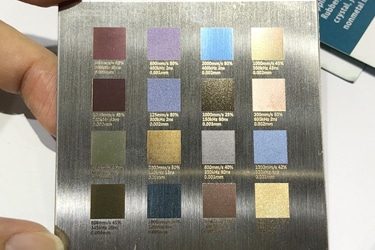
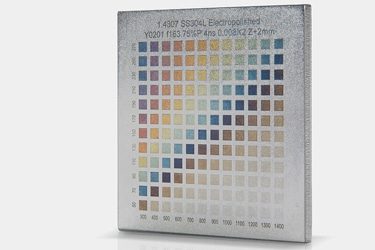
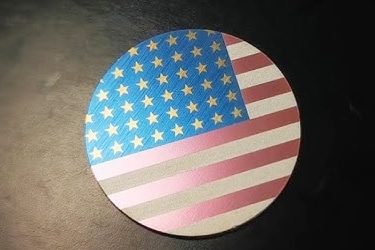
Application of 60W MOPA Laser Marking Machines


Customer Testimonials
Comparison VS Other Marking Technologies
| Comparison Item | MOPA Laser Marking | Dot Peen Marking | Inkjet Printing | Chemical Etching |
|---|---|---|---|---|
| Marking Speed | Very fast; suitable for high-volume production | Moderate; mechanical impact slows it down | Fast, but requires drying | Slow; multi-step process |
| Marking Quality | Extremely fine, clean, and high contrast | Medium; rough, dotted appearance | Good, but can smear or fade | Good, depends on chemical precision |
| Material Compatibility | Works on metals, plastics, anodized and coated materials | Mostly metals | Metals, plastics, paper | Metals and coated materials |
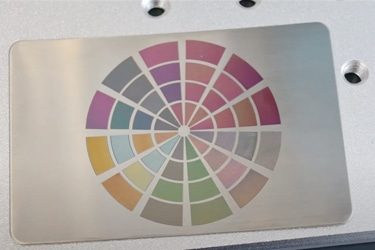
| Color Marking Capability | Can create vivid color marks on stainless steel and anodized aluminum | Not possible | Limited to ink colors | Not possible |
| Permanence | Permanent, wear- and corrosion-resistant | Permanent, but can deform surface | Temporary; ink can fade | Permanent, but surface can degrade |
| Surface Damage | Non-contact; no material deformation | Indents and scratches surface | No physical damage | Can erode or discolor surface |
| Precision on Small Parts | Excellent; ideal for micro-marking | Limited accuracy | Moderate; depends on printhead | Good but less controlled |
| Maintenance Requirements | Very low; no consumables | Frequent stylus replacement | Frequent ink and nozzle cleaning | Regular chemical replacement and cleanup |
| Operating Cost | Low after purchase; no consumables | Low to medium; mechanical wear parts | High; ongoing ink and solvent costs | Medium; chemical use and waste handling |
| Environmental Impact | Eco-friendly; no chemicals or waste | Minimal | Uses solvents, creates fumes | Produces hazardous waste |
| Noise Level | Silent operation | Noisy; mechanical impact | Quiet | Silent |
| Automation Integration | Easily automated; software-controlled | Possible, but slower | Easy to integrate | Difficult; mostly manual |
| Marking Depth Control | Adjustable pulse width allows precise control | Fixed by stylus pressure | Not applicable | Limited by etching time |
| Suitable for 2D Codes / QR Codes | Excellent; precise and high contrast | Poor readability | Moderate; prone to smudging | Not ideal for fine detail |
| Lifespan & Reliability | Over 100,000 hours; minimal wear | Moderate; frequent part replacement | Moderate; nozzle wear and clogging | Shorter; tank corrosion and chemical fatigue |
Why Choose Us
High Precision
Our machines deliver sharp, detailed markings with excellent contrast, suitable for complex patterns and small components across metal, plastic, and other materials.
Fast Processing
Designed for speed and efficiency, our systems complete marking tasks quickly without compromising quality, making them ideal for high-volume production environments.
Low Maintenance
With durable components and minimal consumables, our machines offer stable long-term performance, reducing downtime and keeping operating costs low.
Flexible Solutions
We provide a variety of models and customization options to suit different materials, marking needs, and production setups, ensuring the right fit for your business.
Related Resources
How Do Laser Parameters Affect The Marking Effect?
This article explores how laser power, speed, frequency, pulse width, focus, wavelength, hatch spacing, and material properties influence marking quality, depth, contrast, and precision.
How Does Laser Beam Quality Affect Marking Results?
This article explores how laser beam quality affects marking clarity, contrast, line width, edge sharpness, depth control, heat input, material response, and marking repeatability.
Can Laser Marking Be Removed
This article explores whether laser marking can be removed, the techniques used on different materials, common challenges, removal risks, and industrial use cases.
Can Lasers Be Used For Color Marking
This article explores how laser color marking works, the materials and colors it supports, its industrial applications, advantages, limitations, quality control, and safety factors.
Frequently Asked Questions
What Models Are Available For 60W MOPA Laser Marking Machines?
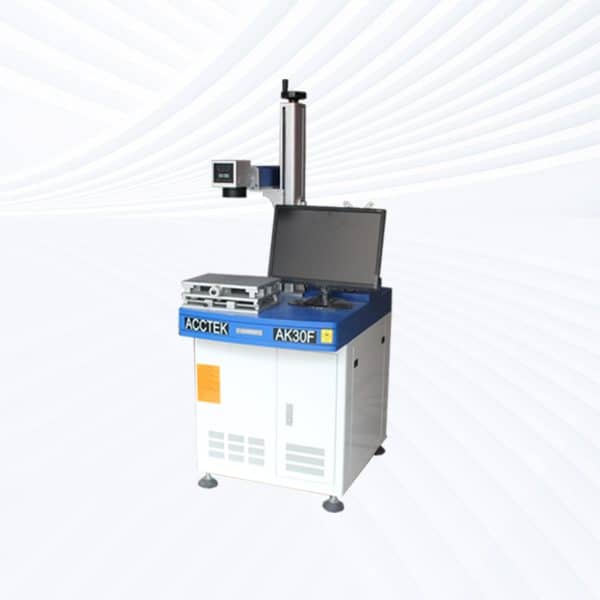
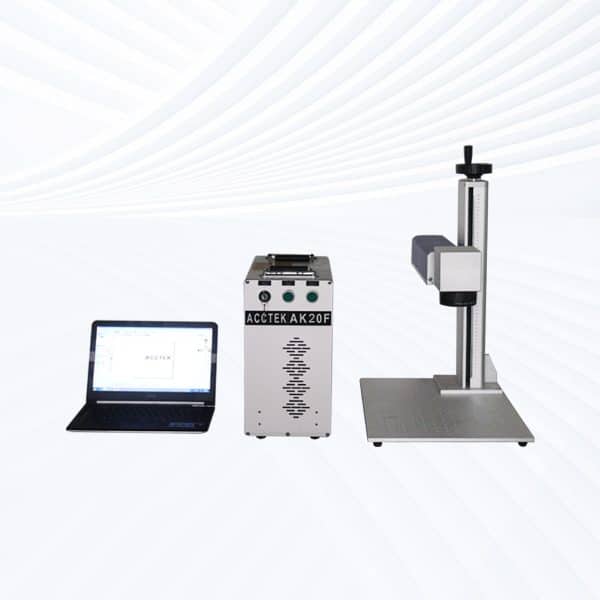
- Desktop Models: Compact and stable, desktop 60W MOPA systems deliver precise marking with adjustable pulse width and frequency. They are ideal for color engraving on stainless steel, anodized aluminum, and other fine-detail applications requiring clean edges and high contrast.
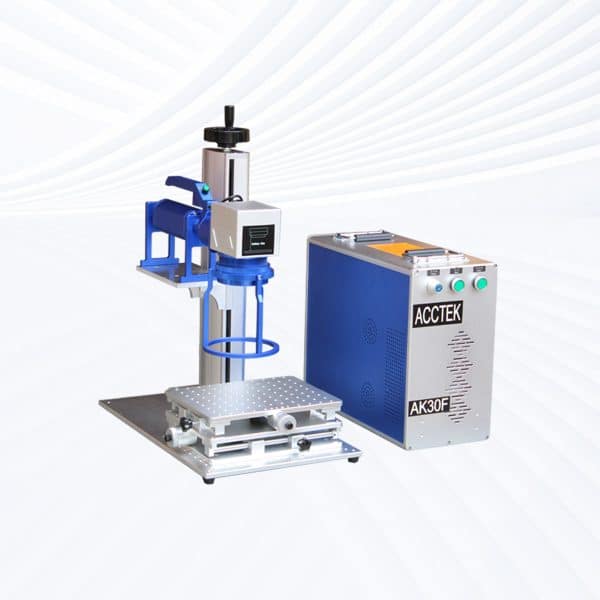
- Portable Models: Offering mobility and flexibility, portable systems provide the same power as desktops but allow easy movement between work areas. They’re suitable for multi-station production, maintenance work, or customized marking on-site.
- Handheld Models: Designed for large or irregularly shaped workpieces, handheld 60W MOPA lasers offer deep and vivid marking performance. They are widely used for machinery, pipes, vehicle parts, and structural components that cannot be moved easily.
- Fully Enclosed Systems: Featuring laser-safe housings, observation windows, and smoke extraction units, these systems ensure operator safety and environmental cleanliness. They are best suited for electronics, jewelry, medical devices, and precision manufacturing.
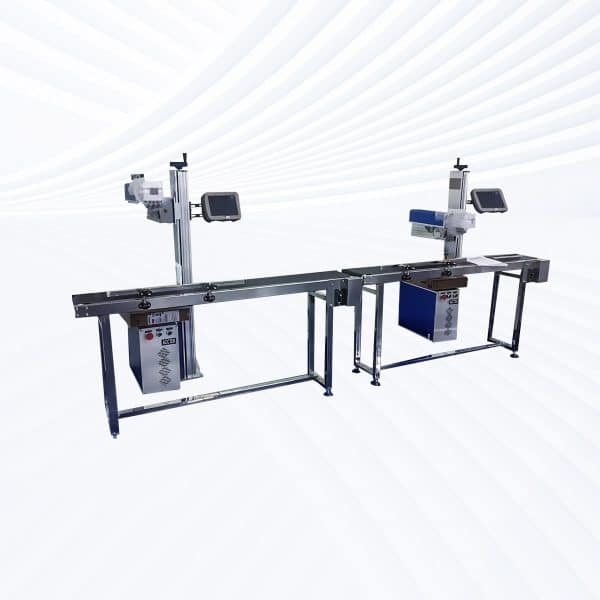
- Flying Lasers: Built for automated production lines, flying 60W MOPA lasers perform continuous marking on moving parts such as packaging, wire, and plastic housings. Adjustable pulse duration allows for high-speed marking with excellent clarity and color consistency.
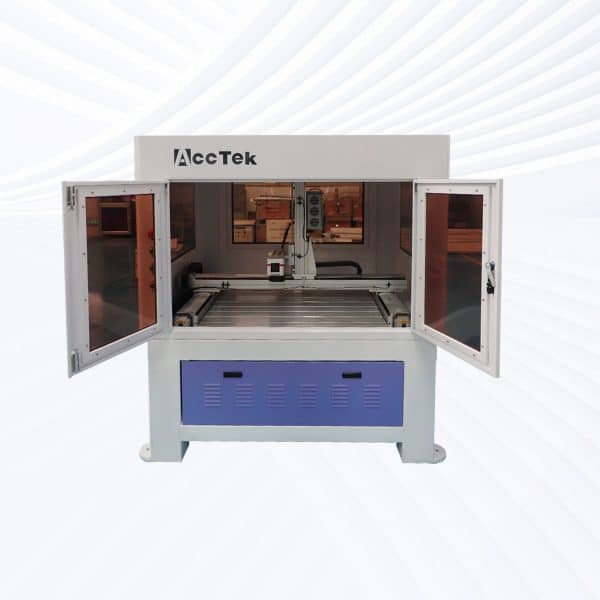
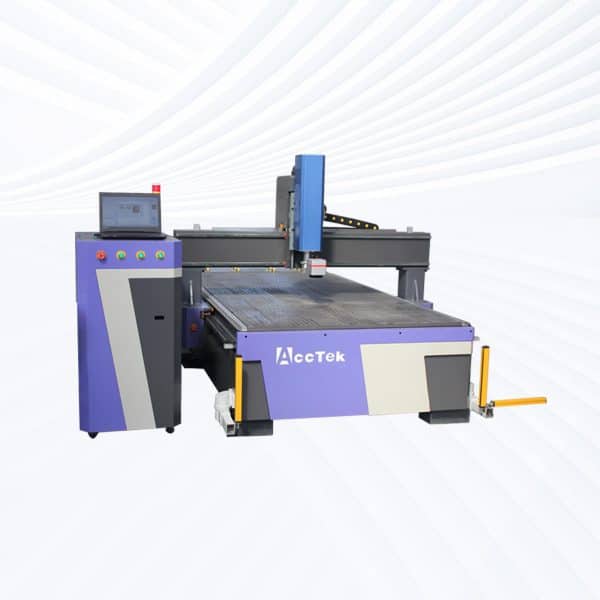
- Large-Area Screw-Drive Systems: Equipped with precision screw motion control, these models provide smooth, accurate engraving over expanded surfaces. They are ideal for detailed industrial markings, large panels, and decorative engravings requiring high precision and uniform color.
- Large-Area Open Rack-Drive Systems: Designed for speed and accessibility, rack-driven MOPA machines handle large or multiple workpieces efficiently. The open-frame layout supports rapid loading and customization for mass-production environments.
How Much Do 60W MOPA Laser Marking Machines Cost?
- Desktop Models ($3100–3700): Compact and stable, these units offer excellent precision for engraving fine text, barcodes, and color logos on stainless steel and anodized aluminum. Ideal for workshops, research labs, and small-scale production.
- Portable Models ($3100–3700): Featuring the same optical performance with greater mobility, portable models are perfect for flexible workstations. They’re suited for light manufacturing, part labeling, or mobile service applications where relocation is frequent.
- Handheld Units ($3500–4100): Designed for large or irregularly shaped workpieces, handheld 60W MOPA lasers provide deep engraving and vibrant color control. Common applications include industrial equipment, pipes, and metal structures.
- Fully Enclosed Systems ($3800–4400): Equipped with laser-safe housings, filtration units, and observation windows, enclosed models ensure operator protection and environmental cleanliness. They are ideal for electronics, jewelry, and medical device manufacturing.
- Flying Lasers ($4400–5000): Integrated into automated production lines, flying 60W systems allow continuous, non-stop marking on moving items like packaging, cable sheaths, and plastic housings. Adjustable pulse width ensures crisp and colorful results even at high speed.
- Large-Area Screw-Drive Systems ($7400–10000): Featuring high-precision screw motion control, these systems guarantee smooth and accurate engraving over extended marking fields. They’re widely used for molds, signage, and industrial panels requiring consistent depth and color.
- Large-Area Open Rack-Drive Systems ($8500–9100): Designed for maximum speed and accessibility, rack-driven models handle oversized workpieces or multi-part engraving efficiently. They’re ideal for mass production with fast turnaround and stable quality.
What Is The Marking Speed Of 60W MOPA Laser Marking Machines?
- Marking Speed Range
- Standard Marking Speed: The speed for 60W MOPA laser marking machines typically ranges from 500mm/s to 8,000mm/s, depending on the material and the complexity of the design being marked. For example, simple text or basic logos can be marked at the higher end of this range, while more intricate or detailed marks may require slower speeds.
- Material Dependent: For metals, especially, the marking speed may be slower to ensure sufficient depth and clarity, while on materials like plastics or ceramics, faster speeds are often achievable.
- Other Factors Affecting Speed
- Laser Power: Higher power can allow faster marking on materials that absorb the laser energy efficiently.
- Marking Frequency and Pulse Width: The pulse frequency and pulse width of the laser can also affect the marking speed. High-frequency pulsing typically results in faster marking speeds.
- Resolution and Detail: Higher resolution or more intricate designs may require slower marking speeds to achieve the desired quality.
What Problems May Occur When Using 60W MOPA Laser Marking Machines?
- Material Compatibility: While MOPA lasers are versatile and can mark a wide range of materials, including metals, plastics, ceramics, and coatings, not all materials are ideal for laser marking. Materials such as certain plastics and metals may require specific adjustments to the laser’s parameters to ensure a high-quality mark. For example, reflective metals like aluminum or copper might cause back-reflection, which can damage the laser if not properly managed.
- Overheating and Burn Marks: A common issue with high-powered lasers, such as the 60W MOPA, is overheating, which can lead to burn marks or distortion of the material being marked. Proper calibration of the laser’s power, speed, and focus settings is critical to avoid this. For heat-sensitive materials, this is especially important to prevent deformation or discoloration.
- Fume Generation: Laser marking generates fumes and smoke, especially when working with materials like plastics, rubber, and some metals. If not properly ventilated, these fumes can impair visibility, damage the laser system, and pose health risks to operators. Installing an effective extraction or filtration system is essential to mitigate this problem.
- Inconsistent Marking Quality: Inconsistent marking can occur if the focus or power settings are not properly calibrated. Variations in material thickness, surface texture, and even ambient temperature can cause uneven marks. The laser lens can also get dirty or damaged over time, leading to a decline in marking quality.
- Reduced Efficiency with High Reflective Materials: MOPA lasers, while effective for many materials, may struggle with highly reflective materials such as certain metals or polished surfaces. The laser energy can reflect off these surfaces and reduce marking efficiency. It can also increase the risk of damaging the laser system. Using anti-reflective coatings or adjusting the laser settings can help mitigate this issue.
- Maintenance and Component Wear: Like any laser marking system, regular maintenance is required to keep the 60W MOPA laser working optimally. Issues such as lens fouling, wear on the laser tube, or alignment problems can affect the quality of the marking. If the system is not maintained properly, it could lead to reduced power output, poor quality marks, and potential system failures.
- Complexity of Software Settings: The software used to control the laser marking machine can be complex, especially for operators who are not familiar with the specific settings of a MOPA laser. Incorrect software settings, like incorrect speed, power, or frequency, can result in poor-quality marks, excessive heat, or damaged materials.
- Limited Depth of Marking: Although MOPA lasers provide good contrast on many materials, they may not be suitable for marking deeper engravings. Achieving deep engraving requires different power settings or even different types of lasers, such as fiber lasers.
- Cost and Energy Consumption: MOPA lasers can be relatively expensive in terms of both initial investment and operating costs, especially when working with power settings that push the machine to its limits. High energy consumption at full power can also increase the cost of operation over time.
What Are The Environmental Requirements For 60W MOPA Laser Marking Machines?
- Temperature and Humidity Control
- Temperature: The laser marking machine should be operated in an environment with a temperature range of 10℃ to 35℃. Temperatures outside this range can cause the machine to overheat or underperform.
- Humidity: The optimal humidity level is between 45% and 75%. High humidity can lead to condensation, affecting the machine’s electronics, while low humidity may increase static electricity, which can damage sensitive components.
- Ventilation and Air Quality
- Fume Extraction: Marking on certain materials can generate fumes, smoke, or harmful gases. It is essential to have a fume extraction system in place to remove toxic fumes and maintain a clean and breathable environment. Using an external fume extractor or air purifier is recommended, especially when working with materials like plastics, rubber, or composites.
- Ventilation: Adequate ventilation is necessary to prevent the buildup of fumes and heat in the workspace. Ensure the area has proper air circulation and exhaust.
- Lighting Conditions
- Ambient Lighting: The work area should be well-lit to allow proper visibility of the workpiece and the laser marking process. However, direct light sources should be avoided to prevent interference with the laser’s beam path and operation.
- Cleanliness and Dust-Free Environment
- Cleanliness: A clean work area is essential to prevent dust, dirt, and debris from interfering with the laser marking process. Dust and dirt can obstruct the marking surface or contaminate the lens, leading to reduced marking quality and damage to the machine.
- Dust Control: If the environment is prone to dust, consider using an air filtration system to keep the workspace clean and free from particulates.
- Electrical and Power Supply
- Power Supply: The 60W MOPA laser marking machine should be connected to a stable power source with a voltage of 110V to 220V, depending on the machine’s specifications. Fluctuations in power supply can damage the machine or lead to inconsistent marking results.
- Surge Protection: Use surge protectors to safeguard the machine from power surges and electrical interruptions.
- Space and Machine Placement
- Surface and Placement: Ensure the laser marking machine is placed on a stable, level surface to prevent vibration, which can affect the marking precision. The machine should be located in a well-ventilated area, ideally with some space around it for safe access and maintenance.
- Space Requirements: Allow sufficient space around the machine for proper operation, maintenance, and airflow. The machine should have at least 1 meter of clearance on each side for safety and airflow.
- Safety and Protection Measures
- Laser Enclosure: The 60W MOPA laser should be used in a closed or shielded environment to prevent accidental exposure to the laser beam. Safety barriers or curtains are essential in preventing laser radiation from escaping the workspace.
- Warning Signs: Clearly mark the laser working area with warning signs indicating laser hazards and safety precautions.
- Noise Control
- Noise Levels: The operation of the laser may generate noise. To minimize disruption, consider using soundproofing materials in the room where the machine is placed. Ensure that the noise level remains within acceptable limits (typically below 85 dB).
- Material-Specific Considerations
- Different materials used for marking may have specific environmental requirements, such as temperature sensitivity, flammability, or emission of harmful gases during the marking process. Always consult material safety data sheets (MSDS) for each material type to ensure the marking area is safe and well-ventilated.
- Maintenance and Calibration Conditions
- Environment for Calibration: Ensure the environment is free from vibrations and thermal fluctuations that may affect calibration and accuracy. A stable temperature and consistent humidity are essential for long-term machine precision.
What Is The Service Life Of 60W MOPA Laser Marking Machines?
- Laser Source Lifespan
- MOPA Laser Source: The heart of the MOPA laser marking machine is the MOPA laser source, which typically has a lifespan of 20,000 to 30,000 hours of continuous operation. This lifespan can vary depending on the power settings used, the frequency of usage, and the cooling system’s efficiency.
- Lower Power Settings: Running the laser at lower power settings or for shorter periods will generally extend the laser’s service life, as it puts less stress on the system.
- Optical Components (Lenses, Mirrors)
- Lenses and Mirrors: The optical components of the machine, such as the lenses and mirrors, are subject to wear and tear over time, primarily due to exposure to dust, smoke, and the high-energy laser beam. These components usually require cleaning and may need replacement every 1-2 years, depending on usage.
- Lens Care: Regular maintenance and cleaning of these optical components can significantly prolong their life. However, improper handling or failure to clean the lenses properly can reduce their effectiveness and lifespan.
- Cooling System
- Cooling Unit Lifespan: The cooling system, often a water chiller, plays a crucial role in maintaining the laser’s performance by preventing overheating. The service life of the cooling system is typically around 3-5 years, depending on the quality of the system and maintenance practices (e.g., cleaning, replacing coolant).
- Proper Maintenance: Ensuring that the cooling system is regularly serviced and free from blockages will help prolong the overall lifespan of the machine.
- Machine Components (Motion System, Electrical Parts)
- Motion System: The mechanical parts, such as the gantry and moving components, have an expected service life of around 5-7 years with proper maintenance. These parts may experience wear from continuous movement, but regular lubrication and periodic inspections can help extend their service life.
- Electrical Components: The electrical components (e.g., power supplies, drivers, and controllers) are generally quite durable and can last for around 7-10 years, provided that they are protected from power surges and environmental factors like humidity or dust.
- Overall Service Life
- Typical Lifespan: When well-maintained, 60W MOPA laser marking machines can last between 10 to 15 years. Regular maintenance and proper care can significantly extend its operational life, whereas neglecting maintenance or operating it in suboptimal conditions may reduce its lifespan.
- Upgrades and Repairs: Over time, certain parts may require upgrading or replacing to keep the machine running efficiently, such as upgrading software or replacing worn-out components. However, the core components, like the laser source, can last for many years with minimal issues.
- Factors Affecting Service Life
- Usage Frequency: Machines that are used heavily and continuously may experience a shorter lifespan than those used intermittently. Continuous heavy usage at high power settings can cause quicker wear.
- Environmental Conditions: Proper environmental conditions, such as temperature control, humidity management, and clean air, are crucial to prolonging the machine’s service life. Excessive dust, high humidity, or fluctuating temperatures can negatively impact the system’s longevity.
What PPE Is Required When Operating 60W MOPA Laser Marking Machines?
- Laser Safety Glasses
- Purpose: Laser marking machines emit intense light, including UV and infrared radiation. This can be harmful to the eyes, leading to temporary or permanent vision damage.
- Requirements: Operators should wear laser safety glasses specifically designed for the wavelength and power of the laser (typically 1064 nm for MOPA lasers). These glasses will protect against the harmful radiation emitted by the laser and ensure safe operation.
- Protective Clothing
- Purpose: To protect the skin from potential burns, intense light, and debris that might be ejected from the material being marked or cut.
- Requirements: Operators should wear long-sleeved clothing made of non-flammable material (such as cotton or polyester) to protect their arms and upper body. Flame-resistant clothing is also recommended, especially when working with materials that may ignite or emit flammable gases.
- Gloves
- Purpose: Gloves protect the hands from burns, debris, and direct exposure to materials that might be affected by the laser. They can also prevent the transfer of oils or contaminants from the hands to the material surface.
- Requirements: Heat-resistant gloves or protective gloves made from a durable material (like leather) should be worn when handling hot components or materials during and after the laser marking process.
- Respiratory Protection
- Purpose: During laser marking, especially with materials like plastics, rubber, and certain metals, harmful fumes or smoke can be generated. Prolonged inhalation of these fumes may cause respiratory issues or be toxic.
- Requirements: Respiratory protection, like a dust mask, N95 respirator, or air-fed respirator, should be worn, particularly if the material being processed produces hazardous fumes. A fume extraction system should also be used to help remove the smoke and fumes from the work area.
- Hearing Protection
- Purpose: Depending on the environment, the noise from the laser system’s cooling fans or exhaust systems can be loud enough to cause hearing discomfort or potential hearing damage with prolonged exposure.
- Requirements: If noise levels exceed 85 decibels, ear protection such as earplugs or earmuffs should be worn to reduce the risk of hearing damage.
- Foot Protection
- Purpose: While not always necessary, wearing protective footwear can prevent injury from dropped objects or other accidents in the work area, such as heavy equipment or materials.
- Requirements: Steel-toe boots or other durable safety shoes are recommended in environments where materials might be heavy or where there is a risk of dropping items.
- Face Shield or Safety Goggles
- Purpose: In addition to laser safety glasses, a face shield or safety goggles may be required for additional protection from flying debris, particularly when working with materials that may break, shatter, or create particles during marking.
- Requirements: A full-face shield can provide additional protection to the operator’s face, especially if high-powered settings or delicate materials that can produce debris are involved.
- Work Environment Safety Measures
- Safety Barriers: While not personal PPE, laser barriers or safety curtains should be installed around the laser marking system to contain the laser beam and prevent accidental exposure to other workers in the area.
- General Hygiene and Maintenance PPE
- Purpose: To maintain cleanliness around the machine and prevent exposure to harmful chemicals or particles during maintenance.
- Requirements: During maintenance, disposable gloves and dust masks should be used to prevent contamination from dust, chemicals, or cleaning solvents used in maintaining the machine’s optics and other components.
How Should 60W MOPA Laser Marking Machines Be Maintained?
- Regular Cleaning
- Lens and Mirrors: Dust and smoke can accumulate on the lens and mirrors, which can degrade the quality of the laser marking. Cleaning these components regularly with a soft, lint-free cloth and a lens cleaner is essential to prevent damage. Isopropyl alcohol can be used to clean the lenses, but avoid using excessive amounts, as this can damage the coatings.
- Cooling System: The cooling system should be cleaned regularly to prevent dust buildup or any debris that could block the airflow. If using a water chiller, it’s important to check and replace the coolant as needed to prevent contamination or buildup that could impair the cooling performance.
- Checking and Replacing the Laser Source
- Laser Source Lifespan: The fiber laser source generally lasts between 20,000 to 30,000 hours of continuous use. While it may not need to be replaced frequently, it’s essential to keep an eye on performance. If the laser output starts diminishing, it could indicate that the laser source is nearing the end of its service life. Regularly monitor the laser’s performance during operation.
- Signs of Wear: If the machine begins showing signs like inconsistent marking, dim output, or failures to start, it could indicate the need for a replacement laser source or internal inspection.
- Calibration and Alignment
- Beam Alignment: The laser beam should be aligned regularly to ensure it is focused correctly and operating at peak efficiency. Misalignment can lead to poor marking quality and increased wear on the machine.
- Optics Calibration: The optics, including lenses and mirrors, should be checked and calibrated as necessary. Misalignment or dirt buildup can negatively impact the marking quality.
- Focusing Lens Adjustment: Ensure that the focusing lens is always in the proper position. Misalignment of the focusing lens can affect the focus spot and, therefore, the quality of the marks.
- Cooling System Maintenance
- Water Chiller: If your machine uses a water chiller, check the chiller unit regularly. Clean the filters and check the water level. Ensure that no algae buildup or sediment in the cooling system might affect cooling efficiency.
- Air Cooling: For systems that use air cooling, make sure the fans and ventilation ducts are free from obstructions and dust. Replace any worn or damaged cooling fans.
- Coolant Replacement: Over time, the coolant in the water chiller can degrade. Replace it at regular intervals as per the manufacturer’s recommendations to maintain optimal cooling efficiency.
- Software and Firmware Updates
- Software Updates: Keep the machine’s control software up-to-date to benefit from any improvements or bug fixes provided by the manufacturer. Ensure that the software settings are configured properly for the materials you are marking.
- Firmware Updates: Similarly, check for firmware updates for the control board to enhance the machine’s functionality and correct any bugs or security vulnerabilities. Perform updates according to the manufacturer’s instructions.
- Air Assist System Maintenance
- Check Air Pressure: Air assist helps to blow away debris and smoke from the marked surface. If your MOPA laser uses an air assist system, check the air pressure regularly to ensure it is working correctly. Low pressure may lead to insufficient cleaning of the surface or affect the marking quality.
- Clean Air Nozzle: The air nozzle can accumulate dust or residue from the marking process. Cleaning the nozzle helps maintain consistent airflow and marking quality.
- Routine Inspection of Mechanical Components
- Gantries and Rails: The gantry system and motion rails need to be lubricated periodically to ensure smooth movement. Inspect the rails for wear and tear, and apply lubrication as needed using a suitable lubricant.
- Check for Loose Parts: Over time, vibrations from the laser’s operation can loosen screws or other components. Regularly check the frame, bed, and all parts of the laser system to ensure everything is securely fastened.
- Belts and Pulleys: Inspect the belts and pulleys for signs of wear or damage. If any belts are fraying or slipping, replace them promptly to avoid system malfunctions.
- Safety Systems and Fume Extraction
- Fume Extraction System: A fume extraction system is critical when working with materials that release harmful gases, such as plastics or rubber. Check the system’s filters regularly and replace them when necessary to ensure efficient fume extraction.
- Safety Interlocks: Test safety features like emergency stop buttons and safety interlocks to ensure they are functioning properly. Regularly inspect the machine for any damage to the safety mechanisms.
- Electrical System Inspection
- Inspect Wiring: Ensure all electrical wiring and connections are intact, free from wear, and securely connected. Check for signs of overheating or damage, and replace any faulty wires immediately.
- Power Supply: Monitor the power supply for voltage stability. Any fluctuations can affect the machine’s performance and lifespan. If the machine is sensitive to power surges, consider using a surge protector or UPS (uninterruptible power supply).
- Software Calibration
- Update Settings for Different Materials: When switching between different types of materials, update the software settings (speed, power, frequency, etc.) for optimal marking quality. Calibration should be performed periodically to ensure that the settings are correct and consistent.
- Periodic Professional Service
- Annual Maintenance: Consider scheduling professional service at least once a year to thoroughly inspect, clean, and calibrate the system. This will ensure that the machine runs at its optimal efficiency and help identify potential issues before they become costly repairs.
- Replacement of Worn Parts: Over time, certain parts like focus lenses, mirrors, or even the laser tube may wear out and need replacement. Regular professional checks can help identify these issues early.