

How To Use CNC Routers
CNC routers have transformed the way people design and build, enabling the production to precise, repeatable parts from wood, plastics, and even metals with minimal manual effort. Whether you’re a hobbyist working out of a small garage or part of a professional workshop, CNC (Computer Numerical Control) routers can open up new levels of creativity and efficiency.
At its core, a CNC router is a machine that follows digital instructions to cut, carve, and shape material. Instead of guiding a tool by hand, you create a design on a computer and let the machine execute it with high accuracy. This shift from manual to digital control not only reduces human error but also allows for complex designs that would be difficult or time-consuming to achieve by hand.
Learning how to use CNC routers involves more than just pressing “start.” It requires an understanding of the full workflow: designing or importing a file, converting that design into machine-readable code, setting up the material correctly, and operating the machine safely. Each step plays a role in the final result, and small mistakes early on can affect the entire project.
This guide is designed to walk you through that process clearly and practically. You’ll learn the essential concepts, tools, and techniques needed to get started, along with tips to avoid common pitfalls. By the end, you should feel confident not only in running CNC routers but also in understanding how to get the most out of them for your own projects.
Table of Contents
Understanding CNC Routers
Before you start using CNC routers, it’s worth slowing down and understanding what’s actually happening inside the machine. On the surface, it may look like simple automated cutting machines. In reality, it’s a system in which software, electronics, and mechanical parts work together. When you understand that system, you’ll not only use the machine more effectively, but you’ll also avoid many common mistakes that beginners run into.
What Are CNC Routers
CNC routers are computer-controlled cutting machines designed to shape materials with high precision. The “CNC” part means the machine follows numerical instructions, usually in the form of G-code, rather than being guided by hand. These instructions tell the machine exactly where to move, how fast to cut, and how deep to go.
The process usually starts with a digital design created in CAD software. That design is then processed in CAM software, which generates the toolpaths the machine will follow. Once loaded into the CNC router, the machine executes those instructions using a spinning cutting tool, gradually removing material to form the desired shape.
What makes CNC routers so powerful is their ability to handle both simple and complex tasks with consistency. You can cut straight lines, curves, pockets, and detailed engravings, all with the same machine. More advanced projects include 3D carving, joinery, and layered designs.
Another key advantage is repeatability. If you need to produce the same part multiple times, CNC routers can do it with very little variation. This is why they are widely used in industries such as furniture making, cabinetry, sign production, and prototyping. At the same time, they’ve become increasingly popular among hobbyists due to the growing availability of affordable machines.
Key Components Of CNC Routers
To use CNC routers well, you need to understand the main components and how they influence performance.
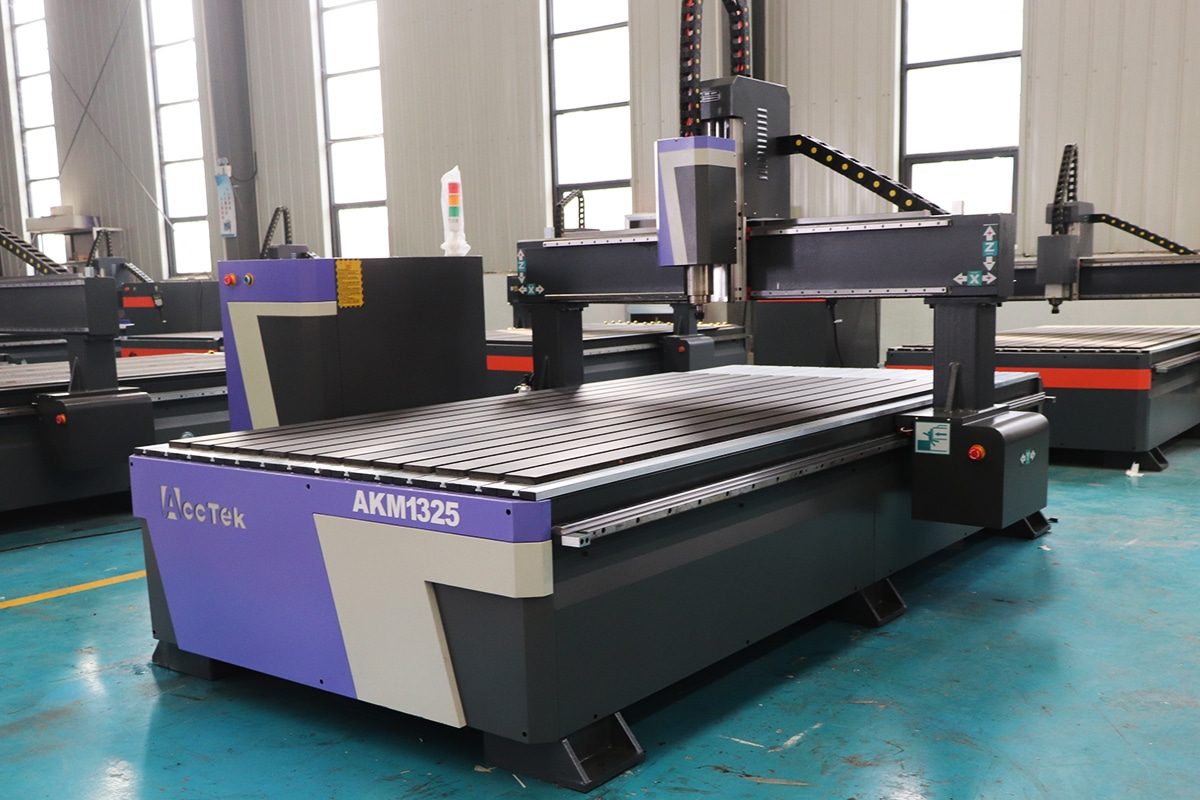
The frame is the structural foundation of the machine. It supports all other components and must remain stable during operation. A rigid frame reduces vibration, which improves accuracy and surface finish. Even small amounts of flex can lead to noticeable defects in the final cut.
The motion system controls how the machine moves. This includes motors (either stepper or servo), drive mechanisms like belts or lead screws, and linear guides or rails. These parts work together to move the cutting head along the X, Y, and Z axes. Smooth, precise motion is essential for clean cuts and accurate dimensions.
The spindle is the component that actually does the cutting. It holds the bit and spins it at high speed. The type of spindle, along with the choice of cutting tool, directly affects the quality of the cut. Different materials require different spindle speeds and feed rates, so understanding this relationship is critical.
The controller acts as the brain of the system. It reads the G-code and converts it into signals that control the motors. A good controller ensures coordinated movement, proper speed control, and accurate positioning.
The work bed is where the material is placed and secured. This might be a simple flat surface, a T-slot table, or a vacuum bed in more advanced setups. Proper workholding is essential. If the material shifts during cutting, the result can be inaccurate or even dangerous.
Other supporting components include limit switches for safety, cable management systems, and dust collection. Dust collection is especially important when working with wood or composites, as it improves visibility, protects your health, and keeps the machine running smoothly.
Types Of CNC Routers
CNC routers vary widely in size, power, and capability, and choosing the right type depends on your intended use.
Desktop CNC routers are compact and relatively affordable. They are ideal for beginners, hobbyists, and small-scale projects. These machines are great for learning, prototyping, and light production work, but they may struggle with harder materials or larger pieces due to limited power and cutting area.
Benchtop or mid-size routers offer a step up in both size and performance. They provide a larger work area and more robust construction, making them suitable for small businesses and serious makers. These machines can handle a wider range of materials and more demanding tasks while still being manageable in a workshop setting.
Industrial CNC routers are designed for high-volume, heavy-duty use. They are larger, faster, and more powerful, often featuring advanced capabilities such as automatic tool changers and vacuum hold-down systems. These machines are commonly used in manufacturing environments where efficiency and precision are critical.
CNC routers can also be categorized by the number of axes they operate on. Most standard machines are 3-axis, which is enough for flat work and basic 3D shapes. 4-axis and 5-axis machines add rotational movement, allowing for more complex geometries and multi-sided machining. These advanced systems are typically used in specialized applications and require more experience to operate effectively.
Understanding CNC routers means seeing them as complete systems rather than just cutting tools. They rely on a combination of digital design, precise motion control, and stable mechanical structure to produce accurate results. When you grasp how designs are translated into machine movements, you gain much more control over your work.
At the same time, knowing the key components helps you make better decisions during setup and operation. Small adjustments, such as improving workholding or selecting the right spindle speed, can have a significant impact on the outcome. This knowledge also makes it easier to troubleshoot when something goes wrong.
Finally, recognizing the different types of CNC routers allows you to match the machine to your needs. Whether you’re working on small creative projects or large-scale production, choosing the right equipment and understanding its capabilities is essential. Together, these insights form a solid foundation for using CNC routers with confidence and precision.
Key Components of CNC Routers
CNC routers work as a coordinated system rather than a collection of separate parts. Every cut you make is the result of multiple components working together at the same time. If one part is weak, misaligned, or poorly understood, it will affect the final result. For that reason, learning the key components in detail is one of the most valuable steps you can take before operating the machine. It not only improves accuracy and efficiency but also helps you prevent mistakes, extend tool life, and maintain consistent performance over time.
Machine Frame
The machine frame is the structural base that holds everything together. It supports the spindle, motion system, and worktable, and it must remain stable throughout the cutting process. When the cutting tool engages the material, it generates force and vibration. A rigid frame absorbs and resists these forces, keeping the machine steady.
Frames are commonly made from steel, cast iron, or aluminum. Steel and cast iron are heavier and provide better vibration damping, which is especially important for high-speed or heavy-duty cutting. Aluminum frames are lighter and more affordable, making them common in desktop machines, but they may flex slightly under load if not well designed.
Frame design also matters. Reinforcement, joint quality, and overall construction determine how well the machine maintains alignment. A poorly built frame can lead to issues like chatter, uneven cuts, or reduced accuracy. Over time, a strong frame also helps protect other components by reducing stress and wear.
Spindle
The spindle is the component responsible for spinning the cutting tool. It is essentially the engine of the CNC router. Without a stable and properly controlled spindle, even the best design and setup will not produce good results.
Spindles operate at high speeds, often between 8,000 and 24,000 RPM or more. The ability to adjust spindle speed is critical because different materials and cutting operations require different conditions. For example, cutting hardwood may require a different speed than cutting acrylic or aluminum.
There are two common types: dedicated CNC spindles and trim routers. Dedicated spindles are quieter, more precise, and designed for continuous operation. They often include advanced features like water or air cooling. Trim routers are more affordable and commonly used in entry-level machines, but they tend to be noisier and less consistent over long periods.
Spindle quality directly affects surface finish, tool life, and cutting efficiency. A well-balanced spindle reduces vibration and allows for smoother cuts, especially in detailed work.
Cutting Tools (Router Bits)
Cutting tools, or router bits, are where the actual material removal happens. They come in a wide range of shapes and configurations, each designed for a specific purpose.
Flat end mills are used for general cutting and slotting. Ball-nose bits are ideal for 3D carving because they create smooth, rounded surfaces. V-bits are commonly used for engraving and decorative lettering. There are also specialized bits for tasks like surfacing large areas, cutting joinery, or creating beveled edges.
The material of the bit is just as important as its shape. Carbide bits are the most common because they are durable and retain sharpness over time. High-speed steel bits are less expensive but wear out more quickly, especially when cutting harder materials.
Selecting the right bit involves more than just choosing a shape. You also need to match it with the correct spindle speed, feed rate, and depth of cut. Poor combinations can lead to burning, tear-out, rough finishes, or broken tools. With experience, you’ll learn how tool selection directly affects both efficiency and quality.
Motion System
The motion system controls how the CNC router moves. It determines how accurately the machine can follow a toolpath and how smoothly it transitions between movements.
This system includes motors, drive mechanisms, and linear guides. Stepper motors are widely used in hobby and mid-range machines because they are reliable and cost-effective. Servo motors, found in higher-end machines, provide feedback and allow for more precise control, especially at higher speeds.
Drive systems can use belts, lead screws, or ball screws. Belts allow for faster travel speeds and are often used in larger machines. Lead screws and ball screws offer greater precision and are commonly used where accuracy is more critical than speed.
Linear rails or guides ensure that movement along each axis remains smooth and aligned. High-quality rails reduce friction and prevent unwanted play or wobble. If the motion system is not properly calibrated or maintained, it can result in inaccuracies such as missed steps, uneven cuts, or visible tool marks.
Controller
The controller is the brain of the CNC router. It interprets the G-code and converts it into commands that control every movement of the machine. It tells the motors where to go, how fast to move, and when to start or stop the spindle.
A good controller ensures smooth and coordinated motion across all axes. This is especially important for curves, corners, and detailed designs where multiple axes must move at the same time. Advanced controllers also manage acceleration and deceleration, reducing sudden movements that can affect cut quality.
In addition to motion control, the controller handles safety features. It works with limit switches to prevent the machine from exceeding its physical boundaries. It also supports emergency stop functions, which allow you to quickly halt operation if something goes wrong.
Understanding your controller, including its settings and capabilities, can significantly improve your results. Small adjustments in acceleration, speed limits, or toolpath interpretation can make a noticeable difference in performance.
Worktable
The worktable is where the material is placed and secured during cutting. While it may seem like a simple component, it plays a crucial role in both accuracy and safety.
There are several types of workholding systems. Basic setups use clamps or screws to hold the material in place. T-slot tables allow for the flexible positioning of clamps, making them suitable for a wide range of projects. Vacuum tables use suction to hold flat materials securely and are commonly used in production environments.
Proper workholding prevents the material from shifting during cutting. Even a small movement can ruin a part or cause the tool to break. A stable setup also reduces vibration, which improves cut quality and extends tool life.
Another important factor is surface flatness. If the worktable is not level, the cutting depth may vary across the material. This is especially noticeable in operations like engraving or surfacing, where precision is critical.
The key components of CNC routers work together as a unified system, where each element directly affects the others. The frame provides the stability needed for accurate cutting, while the spindle delivers the power required to remove material. The motion system ensures that movements are precise and consistent, and the controller coordinates everything according to the programmed instructions. At the same time, the cutting tools and worktable determine how effectively the material is shaped and held in place.
Understanding these components in depth allows you to move beyond basic operation and develop real control over the machining process. Instead of guessing when something goes wrong, you can identify the source of the issue and make targeted adjustments. This not only improves efficiency but also reduces waste and extends the lifespan of both tools and the machine itself.
In practical use, the difference between average and high-quality results often comes down to how well these components are understood and managed. When you know how each part contributes to the outcome, you can approach CNC routing with greater precision, confidence, and consistency.
Materials Suitable for CNC Routing
One of the biggest strengths of CNC routers is their versatility. The same machine can cut soft wood, shape plastics, and even handle certain metals with the right setup. But that flexibility comes with a responsibility: you need to understand how each material behaves. Materials differ in hardness, density, internal structure, and how they react to heat and cutting forces. If you treat them all the same, you’ll quickly run into problems like burning, melting, chipping, or poor surface finish.
A good operator doesn’t just know how to run the machine. They know how the material will respond before the cut even begins. This section gives you a deeper look at the most common material categories used in CNC routing and what to expect when working with them.
Wood Materials
Wood is the most common starting point for CNC routing, and for good reason. It is relatively easy to machine, widely available, and suitable for everything from simple cuts to detailed carvings.
Solid wood can be divided into hardwoods and softwoods. Hardwoods like oak, maple, and walnut are dense and produce clean, sharp edges. They are ideal for furniture and high-quality finishes, but they require slower feed rates and place more load on the machine. Softwoods like pine and cedar are easier to cut and allow faster machining, but they can splinter or compress, especially along the grain.
Grain direction is an important factor when working with solid wood. Cutting against the grain can lead to tear-out, while cutting with the grain usually produces smoother results. This is something you don’t deal with in most other materials.
Engineered wood products are often more predictable. MDF is especially popular because it has no grain and a uniform density, making it ideal for engraving, carving, and painting projects. Plywood is stronger and more durable, but its layered structure can cause edge splintering if the wrong bit or settings are used.
Another factor to consider is moisture. Wood can expand, contract, or warp depending on humidity. If the material is not stable, your cuts may not be consistent. Dust is also a major concern, especially with MDF, which produces very fine particles that require proper extraction.
Plastics
Plastics open up a wide range of possibilities for CNC routing, especially for signs, prototypes, and functional components. They can produce very clean, professional-looking results, but they are more sensitive to heat than wood.
Acrylic is one of the most widely used plastics. When cut correctly, it can produce smooth, almost polished edges. However, it is brittle and can crack if the tool is too aggressive. It also melts easily if heat builds up, which can ruin the finish.
Polycarbonate is tougher and more impact-resistant than acrylic, but it is harder to machine cleanly. It tends to leave rougher edges and requires careful tuning of speeds and feeds.
HDPE is a softer plastic that is very forgiving and easy to cut. It doesn’t crack easily, which makes it a good option for beginners. PVC is also common, particularly in construction and signage, but it produces harmful fumes when cut, so proper ventilation is essential.
The biggest challenge with plastics is managing heat. Unlike wood, plastics don’t burn. They melt. If chips are not cleared efficiently or if the spindle speed is too high, the material can soften and stick to the cutting tool. This not only affects the finish but can also damage the bit.
Metals
CNC routers can cut metals, but this is where machine capability really matters. Most standard routers are not designed for heavy metal cutting, but they can handle softer metals with the right approach.
Aluminum is the most common metal used with CNC routers. It is relatively soft and can be machined effectively if you use proper speeds, feeds, and tooling. Achieving good results requires slower, more controlled cutting compared to wood or plastic.
Brass and copper can also be machined, though they behave differently. Brass tends to cut cleanly, while copper is softer and can deform if not handled carefully.
When working with metals, rigidity is critical. Any flex in the machine can cause chatter, which leads to poor surface finish and increased tool wear. You may also need lubrication or cutting fluid to reduce heat and improve cutting performance.
It’s important to recognize the limits of your machine. Harder metals like steel generally require a CNC mill rather than a router. Trying to cut materials beyond your machine’s capability can result in damage or unsafe conditions.
Composite Materials
Composite materials are engineered by combining different materials to achieve specific properties. They are often strong, lightweight, and durable, but they can be challenging to machine.
Fiberglass and carbon fiber are common examples. These materials are highly abrasive, which means they wear down cutting tools much faster than wood or plastic. They also produce very fine dust that can be harmful if inhaled, so proper dust collection and protective equipment are essential.
Another challenge with composites is their layered or mixed structure. Different layers may respond differently to cutting, which can lead to uneven edges or fraying if the setup is not correct.
Laminated materials, such as certain panels or coated boards, also fall into this category. They may have a hard outer surface and a softer core, requiring careful adjustment of cutting depth and tool selection to avoid chipping or delamination.
Working with composites often requires specialized bits and more conservative cutting parameters. Patience and proper preparation make a big difference in the final result.
CNC routers are capable of working with a broad range of materials, but each one brings its own set of challenges. Wood is the most approachable and forgiving, making it ideal for beginners and general projects. Plastics offer clean and versatile results but require careful heat control to avoid melting or cracking. Metals, particularly softer ones like aluminum, can be machined successfully, though they demand greater precision and a more capable machine. Composite materials expand the possibilities even further but introduce additional complexity in terms of tool wear, dust management, and cutting behavior.
Understanding these differences is essential for consistent, high-quality work. The material you choose affects everything, from tool selection to cutting speed and machine setup. When you take the time to match your approach to the material, you reduce errors, improve efficiency, and extend the life of your tools.
In practice, mastering materials is a gradual process. As you gain experience, you’ll develop a feel for how each material behaves and how to adjust your settings accordingly. That knowledge becomes one of your most valuable assets, allowing you to handle a wider range of projects with confidence and precision.
Preparing the CNC Router
Preparation is where most CNC jobs are won or lost. It’s easy to focus on design or cutting, but the quality of your setup determines how smoothly everything runs afterward. A careful, methodical preparation process reduces errors, improves accuracy, and protects both your machine and your materials. It also builds confidence, because you know everything is set up correctly before the first cut begins.
This stage involves checking the machine, choosing and installing the right tool, and securing the workpiece in a way that keeps it stable throughout the operation. Skipping or rushing any of these steps often leads to problems that are difficult to fix once cutting starts.
Machine Inspection
A proper machine inspection goes beyond a glance. Start by checking the structural integrity of the CNC router. Look for loose bolts, worn belts, or any signs of misalignment. Even small mechanical issues can affect precision, especially during detailed or high-speed operations.
Next, verify that all axes move smoothly. You can do this by jogging the machine through its control system. Pay attention to any unusual resistance, vibration, or noise. These can indicate issues such as dirty rails, insufficient lubrication, or worn components. Clean the machine thoroughly, especially around the rails, lead screws, and spindle area. Dust and debris buildup can interfere with movement and reduce accuracy over time.
Electrical and safety checks are just as important. Confirm that limit switches are functioning correctly and that the emergency stop button responds immediately. If your machine includes lubrication points, make sure they are properly serviced. Taking the time to inspect the machine carefully helps prevent unexpected interruptions and ensures consistent performance.
Tool Selection
Tool selection is not just about picking a bit that “fits.” It requires matching the tool to the material, the type of cut, and the desired finish. The wrong tool can lead to poor surface quality, longer machining times, and even tool breakage.
For general cutting and slotting, flat end mills are commonly used. Ball-nose bits are better for 3D surfaces and curved designs because they produce smoother transitions. V-bits are ideal for engraving and detailed lettering. Larger tools are stronger and remove material faster, while smaller tools allow for finer detail but require more careful handling.
The material of the tool also matters. Carbide tools are more durable and hold their edge longer, especially when working with harder materials or composites. High-speed steel tools are more affordable but wear out faster and are better suited for softer materials.
It’s also important to think about cutting parameters during this stage. The tool you choose will influence spindle speed, feed rate, and depth of cut. A well-matched tool reduces strain on the machine and improves both efficiency and final quality.
Installing the Tool
Installing the tool correctly is essential for safe and accurate operation. Start by cleaning the collet and the tool shank. Any dust or debris can prevent proper seating and cause runout, which leads to vibration and uneven cuts.
Insert the tool into the collet, leaving a small gap at the bottom. This helps ensure a secure grip and proper alignment. Tighten the collet firmly using the correct wrench, but avoid excessive force, which can damage the components.
After installation, check that the tool is straight and properly aligned. If your setup allows, run the spindle briefly at a low speed without engaging the material. This helps confirm that the tool is rotating smoothly and without wobble.
A properly installed tool improves cutting accuracy, reduces vibration, and extends the life of both the tool and the spindle. It’s a simple step, but it has a major impact on the overall result.
Securing the Workpiece
Securing the workpiece is one of the most critical parts of preparation. If the material shifts during cutting, even slightly, the entire job can be compromised. In some cases, it can also create a serious safety risk.
There are several workholding methods to choose from. Clamps are widely used and effective for many types of projects. T-slot tables allow flexible placement of clamps, making them suitable for different shapes and sizes. Vacuum tables are commonly used in professional settings to hold flat materials quickly and evenly.
No matter the method, the workpiece must be flat and stable against the worktable. Any unevenness can cause variations in cutting depth, especially in precision work. Check that all clamps are tight and positioned safely outside the toolpath. It’s also a good idea to perform a dry run or simulation to ensure the tool will not collide with clamps or fixtures.
Proper workholding improves accuracy, reduces vibration, and allows the machine to operate efficiently. It also gives you confidence that the material will stay in place throughout the entire cutting process.
Preparing the CNC router is a structured process that directly influences the success of your work. A detailed machine inspection ensures that all components are functioning correctly and that the machine can move smoothly and accurately. Thoughtful tool selection allows you to match the cutting process to the material and design, improving both efficiency and finish quality.
Correct tool installation ensures stability and minimizes vibration, while careful workpiece securing guarantees that the material remains fixed and properly aligned during machining. Each of these steps supports the others, forming a complete preparation workflow that reduces risk and increases reliability.
In real-world use, the difference between a smooth job and a failed one often comes down to preparation. When you take the time to set everything up properly, you not only improve your results but also develop habits that lead to consistent, high-quality work. Over time, this preparation process becomes second nature, allowing you to focus more on creativity and precision while maintaining full control over your CNC operations.
Setting Up the Work Coordinates
Setting up work coordinates is the step that connects your digital design to the real-world material on your CNC router. It defines where the machine will begin cutting and how it interprets every movement in the toolpath. Even a small mistake here can shift the entire job, ruin alignment, or cause the tool to cut at the wrong depth. Because of this, coordinate setup is not just a technical step. It’s a control point that determines accuracy, repeatability, and overall success.
A well-planned coordinate setup also makes your workflow more efficient. It allows you to run multiple parts consistently, align multi-step operations, and avoid unnecessary adjustments once the job starts.
Understanding Coordinate Systems
To work confidently with CNC routers, you need a clear understanding of coordinate systems. There are two main systems in use: the machine coordinate system and the work coordinate system.
The machine coordinate system is fixed and built into the CNC router. It is established during the homing process, when the machine moves each axis to a known reference position using limit switches. Once homed, the machine always knows its position relative to this internal reference. This system does not change and acts as the foundation for all movement.
The work coordinate system is defined by you, the operator. It tells the machine where your material is located within the machine’s workspace. Every project can have its own work coordinate system, depending on how the material is positioned.
Most CNC controllers support multiple work offsets, often labeled G54, G55, and so on. This allows you to store different coordinate setups for different parts or fixtures. For example, you might use one offset for the first piece on the table and another for a second piece placed beside it.
The key idea is that the machine coordinate system answers “Where is the machine?” while the work coordinate system answers “Where is the job?” Understanding this relationship helps you avoid confusion and gives you more control over your setup.
Setting the Origin (Zero Point)
The origin, or zero point, is the exact location from which all tool movements are measured. It is one of the most important decisions in your setup because it determines how your design aligns with the material.
The origin is defined along three axes. The X and Y axes control horizontal positioning, while the Z axis controls vertical positioning and cutting depth. A common approach is to set the X and Y origin at a corner of the workpiece, often the front-left corner, because it is easy to locate and repeat. Another common method is to use the center of the material, which is useful for symmetrical designs or circular parts.
To set the origin, you jog the machine so the tool is positioned exactly where you want the starting point to be. Once in position, you reset the X, Y, and Z values to zero in the control software. This tells the machine that this point corresponds to the origin in your design.
Precision matters here. If your origin is even slightly off, every cut will be offset by that same amount. This becomes especially noticeable in detailed work or when parts need to fit together. Errors in the Z-axis are equally critical. Setting the Z zero too high can result in incomplete cuts, while setting it too low can damage the material or break the tool.
It’s also important to stay consistent. The origin you set on the machine must match the origin used in your CAD/CAM software. If your design assumes a center origin but you set a corner origin on the machine, the result will be misaligned.
Using Touch-Off Tools
Setting the Z-axis accurately can be challenging when done manually, which is why touch-off tools are commonly used. These tools help you establish a precise Z zero point by detecting the exact moment the cutting tool contacts a reference surface.
A typical touch-off tool consists of a conductive plate connected to the machine’s controller. You place the plate on top of the workpiece and run a probing routine. The machine lowers the tool slowly until it touches the plate, completing an electrical circuit. The controller then records this position and adjusts for the known thickness of the plate to set the true Z zero.
This method provides a much higher level of accuracy compared to manual techniques. It is especially useful for detailed work, thin materials, or operations where depth control is critical.
In situations where a touch-off tool is not available, a common alternative is the “paper method.” You place a thin piece of paper between the tool and the material and lower the tool until it lightly grips the paper. While this method can be effective, it relies on feel and is less precise.
Some advanced CNC routers also include automatic tool setters, which can measure tool length and reset the Z-axis automatically when changing tools. These systems are particularly useful in production environments where efficiency and repeatability are important.
Setting up work coordinates is the step that connects your digital design to the physical cutting process. By understanding coordinate systems, you gain clarity on how the machine determines position and movement. This knowledge helps you avoid alignment errors and ensures that your toolpaths are executed exactly as intended.
Establishing a precise origin point provides a reliable reference for all machining operations. It ensures that cuts are positioned correctly and that multiple passes or tool changes remain aligned. Tools like touch-off devices further improve accuracy, particularly for the Z-axis, where even small errors can significantly affect the final result.
In practice, careful coordinate setup leads to better precision, fewer mistakes, and more efficient workflows. It becomes even more important as projects grow in complexity or require repeatability. By mastering this step, you build a strong foundation for consistent, high-quality CNC machining.
Loading and Verifying G-Code
Loading and verifying G-code is the final checkpoint before your CNC router begins cutting. At this stage, your design has already been created and converted into machine instructions, but that doesn’t guarantee a successful result. The machine will execute whatever is in the file exactly as written, regardless of whether it matches your setup. That’s why this step is less about “starting the job” and more about confirming that everything is correct.
A careful verification process helps you catch issues early, reduce material waste, and avoid damaging tools or the machine. It also builds a habit of working methodically, which becomes increasingly important as projects grow more complex.
Importing the Program
The first step is to load the G-code file into your CNC control software. This file is usually exported from your CAM software after defining toolpaths, cutting depths, and machining strategies. Depending on your system, the file may be transferred via USB, a network connection, or directly through integrated software.
Once the program is loaded, pause and review it carefully. Confirm that you have selected the correct file, especially if you are working with multiple versions or similar project names. A simple mistake here can lead to running an outdated or incorrect program.
Next, check the core settings embedded in the G-code. Verify the units to ensure they match your setup. A mismatch between millimeters and inches can scale the entire job incorrectly. Review tool numbers and confirm they correspond to the tools installed in the machine. If your program calls for a tool that isn’t loaded, the result will not match your expectations.
Also, examine spindle speeds, feed rates, and depth values. These should align with the material and tooling you prepared earlier. If they seem too aggressive or too slow, it’s better to adjust them now rather than risk poor cutting performance.
Finally, confirm that the correct work coordinate system is active. If your machine uses offsets like G54 or G55, make sure the program matches the one you set when establishing your origin. This ensures the toolpath starts in the correct location on the workpiece.
Simulation
Simulation is a powerful way to preview how your CNC router will execute the program. Most CAM software and many machine controllers provide a simulation feature that allows you to visualize the toolpath before running it.
During simulation, you can observe the tool as it moves through each step of the operation. This includes cutting passes, rapid movements, entry points, and depth changes. Watching the full sequence helps you understand the flow of the job and identify anything that doesn’t look right.
Pay close attention to cutting depths and tool engagement. If the tool appears to cut too deep or not deep enough, it could indicate an issue with your Z-axis setup or toolpath configuration. Also, look for unexpected movements, such as the tool traveling outside the intended cutting area or skipping parts of the design.
Rapid moves deserve special attention. These are non-cutting movements where the tool travels quickly between positions. If not planned correctly, they can bring the tool dangerously close to clamps or fixtures.
While simulation cannot account for every real-world variable, it is extremely effective at catching programming errors and giving you a clear picture of what to expect.
Dry Run
A dry run is the final and most practical verification step. Unlike simulation, which takes place on a screen, a dry run happens on the actual machine. It allows you to observe the machine’s movements in real space without cutting the material.
To perform a dry run, you can raise the tool above the workpiece or disable the spindle so that no cutting occurs. The machine will then execute the program exactly as it would during a real job.
Watch the machine closely as it moves. Confirm that it starts at the correct origin point and follows the expected path. Check that all movements stay within the boundaries of the material and that there is sufficient clearance from clamps, fixtures, and other obstacles.
A dry run is especially useful for detecting setup-related issues. For example, if your work coordinates are slightly off, you’ll see the toolpath shift in real space. It also allows you to verify that the machine moves smoothly and that there are no unexpected pauses or errors.
Always be ready to stop the machine during a dry run. If something looks wrong, stop immediately and investigate. It’s far easier to fix a problem at this stage than after the tool has begun cutting into the material.
Loading and verifying G-code is a critical step that bridges the gap between digital preparation and physical machining. By carefully importing and reviewing the program, you ensure that the correct file, tools, and settings are in place before the machine begins its work. This simple habit can prevent many common and costly mistakes.
Simulation provides a visual check of the toolpath, helping you identify errors in movement, depth, or sequence before they reach the machine. Following this with a dry run adds a real-world layer of verification, allowing you to confirm alignment, clearance, and overall machine behavior in a safe and controlled way.
Together, these steps create a reliable process that reduces risk and increases confidence. In practice, taking the time to verify your G-code leads to smoother operations, fewer interruptions, and more consistent results. It turns the transition from design to production into a controlled and predictable process rather than a trial-and-error approach.
Operating the CNC Router
Operating CNC routers is the stage where all your preparation, setup, and planning come together. While the machine follows programmed instructions, it is not a “set it and forget it” process. The operator remains responsible for supervising the job, responding to changes, and ensuring everything runs safely and efficiently.
Think of this phase as active management rather than passive observation. You are watching how the machine behaves in real conditions—how the tool interacts with the material, how the machine sounds under load, and whether everything is performing as expected. Good operation habits reduce errors, protect equipment, and lead to more consistent results.
Starting the Machine
Starting the CNC router should always begin with a final check. Confirm that the correct G-code file is loaded, the proper tool is installed and tightened, and the workpiece is securely fixed to the table. Double-check that your work coordinates and origin point match your setup.
Before engaging the material, ensure the spindle is ready. If controlled manually, bring it up to the correct speed. If automated, watch to confirm that it reaches the programmed RPM. Starting the spindle correctly helps avoid sudden load on the tool when it first contacts the material.
When you begin the program, stay focused on the first few movements. This is the most critical moment in the operation. Watch how the tool moves to the starting position and how it enters the material. Check that the depth of the first cut matches your expectations.
Keep your hand near the control interface or emergency stop during this phase. If the tool moves to the wrong location, cuts too deeply, or behaves unexpectedly, stop the machine immediately. Catching an issue early can prevent tool breakage, wasted material, or damage to the machine.
A controlled and attentive start sets the tone for the entire job.
Monitoring the Cutting Process
Once the machine is running, continuous monitoring is essential. Even though the toolpath is pre-programmed, real-world variables can still affect performance. Materials may vary slightly in density, tools can wear down, and small setup issues may only become visible during cutting.
Watch the cutting action closely. The tool should move smoothly, and the material should be removed in a consistent manner. Chips or dust should clear properly from the cutting area. If you notice buildup, uneven cutting, or hesitation, it may indicate a problem.
Sound is a valuable indicator. A steady, consistent cutting sound usually means the process is stable. Changes in sound—such as high-pitched squealing, harsh vibration, or irregular noise—often signal issues like incorrect feed rates, dull tools, or excessive cutting force.
Heat is another factor to monitor. In wood, excessive heat may cause burning. In plastics, it can lead to melting and material sticking to the tool. In metals, overheating can reduce tool life and affect surface quality. Proper chip removal and correct cutting parameters help manage heat.
Also, keep an eye on the workpiece. Make sure it remains firmly secured and does not shift or vibrate. Check that clamps remain tight and clear of the toolpath. If anything changes unexpectedly, pause or stop the machine and investigate before continuing.
Adjusting Parameters
During operation, you may need to make small adjustments to improve cutting performance. Many CNC controllers allow you to modify feed rate and spindle speed in real time.
For example, if the machine sounds strained or the tool appears to be working too hard, you can reduce the feed rate slightly to reduce the load. If the cut seems too light or inefficient, you may increase the feed rate within safe limits to improve productivity.
These adjustments should always be gradual. Sudden or large changes can destabilize the cutting process and increase the risk of tool damage. It’s also important to understand that adjustments affect both the machine and the material. Increasing speed too much can reduce cut quality, while slowing down too much can cause heat buildup.
Ideally, most parameters are set correctly during the CAM stage. Real-time adjustments are best used for fine-tuning based on what you observe. Over time, you will develop a sense of how the machine should sound and behave, making it easier to make confident adjustments.
Emergency Stops
Safety is a fundamental part of CNC operation, and the emergency stop is your most important safety feature. Every operator should know exactly where it is located and be ready to use it instantly.
The emergency stop immediately halts all machine movement and shuts down the spindle. It should be used whenever there is a risk of damage or injury. Common situations include tool breakage, unexpected machine movement, material shifting, or potential collisions with clamps or fixtures.
Do not hesitate to use the emergency stop if something looks wrong. Stopping the machine quickly is always better than allowing a problem to continue. After stopping, take time to assess the situation, identify the cause, and correct it before restarting.
Regularly checking that the emergency stop function works properly is also part of responsible machine operation. Knowing that you can stop the machine at any moment adds an important layer of control and confidence.
Operating CNC routers is an active and controlled process that requires attention throughout the job. Starting the machine carefully allows you to confirm that your setup is correct and that the program begins as expected. Continuous monitoring helps you detect changes in cutting behavior, using visual cues, sound, and material response to guide your decisions.
Making small parameter adjustments during operation allows you to refine performance and improve results, while understanding and using the emergency stop ensures that you can respond quickly to any unexpected situation.
In practice, effective CNC operation comes from staying engaged and observant. By combining careful supervision with timely action, you can achieve accurate, consistent results while maintaining a safe and efficient working environment.
Understanding Cutting Parameters
Cutting parameters are the controls that determine how your CNC router actually performs during a job. They influence everything from surface finish and accuracy to tool life and machining time. Even with a well-prepared setup and correct toolpaths, poor parameter choices can lead to common problems like burning, melting, chatter, rough edges, or broken tools.
What makes this topic more complex is that these parameters are interconnected. You cannot change spindle speed, feed rate, depth of cut, or chip load in isolation without affecting the others. The goal is not to find a single “perfect” value, but to create a balanced combination that matches your material, tooling, and machine capability. Understanding this balance is a major step toward consistent, professional results.
Spindle Speed
Spindle speed refers to how fast the cutting tool rotates, measured in revolutions per minute (RPM). It determines how often the cutting edges contact the material and plays a key role in surface quality and heat generation.
Higher spindle speeds are typically used for softer materials like wood and many plastics. Faster rotation allows the tool to cut cleanly and produce smoother edges. However, if the speed is too high for the chosen feed rate, the tool may begin to rub instead of cutting. This creates friction and heat, which can burn wood, melt plastics, or dull the cutting edges prematurely.
Lower spindle speeds are generally used for harder materials such as aluminum or other metals. Slowing the rotation reduces heat buildup and helps maintain better control over the cutting process. However, if the speed is too low, the cutting action may become uneven, leading to a rough finish and increased mechanical stress on the tool.
In practice, spindle speed should always be selected in combination with feed rate and tool geometry. A balanced speed allows the tool to cut efficiently without excessive heat or vibration.
Feed Rate
Feed rate is the speed at which the cutting tool moves through the material, usually measured in millimeters per minute or inches per minute. It directly affects how quickly material is removed and how the tool interacts with the workpiece.
A higher feed rate increases productivity and can improve cutting efficiency when properly matched with spindle speed. It helps ensure that the tool is actively cutting rather than rubbing, which reduces heat buildup and improves chip formation.
However, if the feed rate is too high, the tool may be overloaded. This can cause deflection, vibration, rough edges, or even tool breakage. The machine may also lose accuracy if it cannot handle the increased cutting forces.
A feed rate that is too low creates the opposite problem. The tool spends more time in contact with the material, increasing friction and heat. This often leads to burning in wood, melting in plastics, and faster tool wear.
The key is to maintain a feed rate that allows steady, controlled cutting while keeping forces and temperatures within safe limits. This balance improves both efficiency and finish quality.
Depth of Cut
Depth of cut refers to how much material is removed in a single pass of the tool. It is one of the most important factors in determining cutting load and overall machining strategy.
Deeper cuts remove more material at once, which can significantly reduce machining time. This approach is often used in roughing operations where the goal is to clear material quickly. However, deeper cuts also increase the load on the tool and the machine. If the depth is too aggressive, it can lead to tool deflection, poor surface finish, or breakage.
Shallower cuts reduce stress on the tool and provide better control over the cutting process. They are especially useful for finishing passes, detailed features, or when using small-diameter tools. The trade-off is that more passes are required, which increases overall machining time.
A common strategy is to combine both approaches: use deeper cuts for roughing to remove bulk material, then switch to lighter passes for finishing to achieve a clean and accurate result. This balance helps optimize both speed and quality.
Chip Load
Chip load is the amount of material removed by each cutting edge (or flute) of the tool during one revolution. It is a key concept because it reflects how effectively the tool is cutting rather than rubbing.
When the chip load is correct, each cutting edge removes a consistent chip. This allows the tool to stay cool, maintain sharpness, and produce a clean finish. Proper chip formation also helps carry heat away from the cutting zone.
If the chip load is too low, the tool does not cut efficiently. Instead, it rubs against the material, generating heat and friction. This leads to burning, melting, and rapid tool wear. If the chip load is too high, each cutting edge removes too much material, increasing stress on the tool and causing rough cuts or breakage.
Chip load is influenced by spindle speed, feed rate, and the number of flutes on the tool. For example, increasing the feed rate or reducing spindle speed increases chip load, while adding more flutes reduces the amount of material removed per edge.
Understanding chip load helps you see how all the other parameters connect. It provides a practical way to evaluate whether your settings are balanced and efficient.
Cutting parameters are the core of CNC routing performance. Spindle speed controls how fast the tool rotates, feed rate determines how quickly it moves through the material, depth of cut defines how much material is removed per pass, and chip load describes how effectively each cutting edge performs. These parameters are closely linked, and adjusting one will always influence the others.
Learning to balance these settings is essential for achieving consistent, high-quality results. Properly tuned parameters improve surface finish, extend tool life, and reduce the risk of problems such as overheating, vibration, or tool failure. Instead of relying on fixed values, effective CNC operation involves understanding how these factors interact and adjusting them based on the specific material and task.
In real-world use, mastering cutting parameters takes time and experience. Starting with recommended values and making small, controlled adjustments based on observation will help you build confidence. As you gain experience, you’ll develop a better sense of how the machine should behave, allowing you to optimize performance and handle a wider range of projects with precision and efficiency.
Common CNC Router Operations
Once you move beyond basic setup and operation, understanding common CNC router operations becomes essential. These operations are the practical ways CNC routers remove material and shape a workpiece. Almost every project—whether simple or complex—is built from a combination of these core techniques.
Each operation follows a specific strategy and serves a different purpose. Choosing the correct one affects not only the final appearance of the part but also machining time, tool wear, and overall efficiency. As you gain experience, you’ll start to think less in terms of “running a machine” and more in terms of selecting and combining operations to achieve a result.
Cutting
Cutting, also known as profiling or contour cutting, is the most fundamental CNC router operation. It is used to define the outer shape of a part or to separate it from the surrounding material.
In this operation, the tool follows a predefined path along the outline of the design. Depending on your settings, the tool can cut directly on the line, inside the line, or outside the line. This choice determines the final dimensions of the part and must match your design intent.
Cutting is commonly used for producing panels, signs, cabinetry parts, and structural components. Because material thickness often exceeds what can be safely removed in one pass, cutting is usually done in multiple passes. Each pass removes a portion of the material until the full depth is reached.
To prevent the part from shifting or breaking free during the final pass, small tabs are often left connecting the part to the surrounding material. These are removed later during finishing.
The quality of a cutting operation depends on proper tool selection, stable workholding, and balanced cutting parameters. Clean edges, minimal tear-out, and accurate dimensions are the main goals.
Engraving
Engraving focuses on adding detail rather than removing large amounts of material. It is used to create shallow cuts on the surface, such as text, logos, decorative lines, and fine patterns.
This operation typically uses V-bits or very small end mills to achieve sharp and precise features. The depth of cut is usually shallow, but consistency is critical. Even slight variations in depth can affect the clarity and visual quality of the engraving.
Engraving requires careful control of the Z-axis and often benefits from slower feed rates to maintain accuracy. It is widely used in signage, product labeling, personalization, and artistic applications.
Surface quality plays a major role in engraving. Any unevenness in the material or errors in setup will be visible in the final result. For this reason, a flat workpiece and accurate Z-zero setting are especially important.
Pocketing
Pocketing is used to remove material from within a defined boundary to create a recessed area. Unlike cutting, which follows the outer edge, pocketing clears out the interior of a shape.
This operation is commonly used for creating slots, cavities, inlays, and areas where components need to fit. For example, it can be used to create a recess for hardware or to prepare a surface for joining parts.
The tool moves across the area in a controlled pattern, gradually removing material layer by layer. Common toolpath strategies include raster (back-and-forth) and spiral movements. Each method has advantages depending on the material and desired finish.
Key factors in pocketing include step-over, depth per pass, and chip evacuation. A smaller step-over produces a smoother surface but increases machining time. Efficient chip removal is also important to prevent heat buildup and maintain cut quality.
Pocketing is often used in combination with other operations and plays a critical role in many functional designs.
Drilling
Drilling is used to create holes at precise locations and depths. While it may appear simple, accurate drilling is essential in many CNC applications, especially those involving assembly.
In CNC routing, drilling is typically performed as a vertical plunge into the material at specific coordinates. This can be done using dedicated drill bits or end mills, depending on the setup and required accuracy.
For deeper holes, peck drilling is often used. This technique involves repeatedly entering and retracting the tool to clear chips and reduce heat buildup. It improves hole quality and helps prevent tool damage.
Drilling is widely used for creating holes for screws, bolts, dowels, and alignment features. Precision is key, as even small errors in position or depth can affect how parts fit together.
3D Carving
3D carving is one of the most advanced CNC router operations. It involves shaping the material into three-dimensional forms based on a digital model.
This operation is used for producing sculptures, relief carvings, molds, and complex decorative elements. It requires specialized toolpaths generated from 3D design software.
3D carving is usually performed in stages. A roughing pass removes the bulk of the material quickly using a larger tool. This is followed by one or more finishing passes using smaller tools, often ball-nose bits, to refine the surface and capture fine details.
The level of detail depends on factors such as tool size, step-over, and cutting parameters. Smaller step-over values produce smoother surfaces but significantly increase machining time.
Because of its complexity, 3D carving requires careful planning and longer run times. However, it allows for highly detailed and visually impressive results that are not possible with simpler operations.
Common CNC router operations form the practical foundation of all CNC work. Cutting defines the outer shape of a part, engraving adds fine surface detail, pocketing creates internal spaces, drilling produces precise holes, and 3D carving enables complex, sculpted forms. Each operation has its own purpose and requires specific tools and strategies to perform effectively.
In real-world projects, these operations are rarely used alone. Most designs combine several of them to achieve both functional and aesthetic goals. For example, a single part may be cut to shape, pocketed for components, drilled for assembly, and engraved for labeling.
Understanding how these operations work—and how they interact—gives you greater control over the entire machining process. It allows you to plan more efficient toolpaths, reduce errors, and produce higher-quality results. As your experience grows, you’ll be able to combine these operations with confidence, creating more complex and refined projects with your CNC router.
Toolpath Strategies
Toolpath strategies define how a CNC router actually removes material. They control the path the tool follows, how it enters and exits cuts, how much load is placed on the tool, and how efficiently the job is completed. Even with the same design and cutting parameters, different toolpath strategies can produce very different results in terms of surface quality, machining time, and tool wear.
Instead of thinking of toolpaths as just “lines the machine follows,” it’s more useful to see them as cutting approaches. Each strategy is designed for a specific purpose, whether it’s shaping the outer edge of a part, clearing material quickly, or refining a surface to a high level of detail. Choosing the right strategy at the right stage of the process is key to achieving consistent, high-quality results.
Profile Toolpaths
Profile toolpaths, also known as contour toolpaths, are used to define the outer shape of a part or to cut along a specific boundary. This is one of the most fundamental and widely used strategies in CNC routing.
In a profile operation, the tool follows a path that is offset from the design line by the radius of the tool. You can choose to cut outside the line for external shapes, inside the line for internal features, or directly on the line when accuracy allows. This choice determines the final dimensions of the part and must match your design intent.
Profile cuts are typically performed in multiple passes, especially when working with thicker materials. This approach reduces cutting force, improves accuracy, and minimizes stress on the tool. Techniques such as ramping or helical entry are often used to introduce the tool gradually into the material, rather than plunging straight down.
Lead-in and lead-out moves are also important. They allow the tool to enter and exit the cut smoothly, reducing visible marks on the finished edge. Tabs are frequently added to keep the part attached to the surrounding material until the final pass, preventing movement or damage.
When done correctly, profile toolpaths produce clean, accurate edges with minimal finishing required.
Pocket Toolpaths
Pocket toolpaths are used to remove material from within a defined area, creating flat-bottomed cavities or recessed features. This strategy is essential for operations such as creating slots, inlays, recesses for hardware, or internal cutouts.
The tool moves across the interior of the shape in a systematic pattern, gradually clearing material layer by layer. Common patterns include raster (back-and-forth) and spiral toolpaths. Raster paths are simple and effective, while spiral paths often provide smoother motion and more consistent cutting forces.
Key factors in pocketing include step-over, step-down, and toolpath pattern. Step-over controls how much material is removed side-to-side, while step-down determines how much material is removed vertically in each pass. Smaller step-over values produce smoother surfaces but increase machining time.
Chip evacuation is especially important in pocketing. If chips are not cleared effectively, they can be recut, leading to heat buildup, reduced tool life, and poor surface finish. Proper toolpath design helps maintain a consistent cutting environment.
Pocketing is often used in combination with finishing passes to achieve both efficient material removal and a clean final surface.
Adaptive Clearing
Adaptive clearing is an advanced roughing strategy designed to maximize efficiency while maintaining consistent cutting conditions. Unlike traditional pocketing, which may cause uneven tool engagement, adaptive clearing continuously adjusts the toolpath to keep the cutting load stable.
In this approach, the tool follows smooth, flowing paths that avoid sharp corners and sudden changes in direction. This allows the tool to maintain a consistent engagement with the material, reducing stress and enabling higher feed rates and deeper cuts.
Adaptive clearing is particularly effective for removing large amounts of material quickly. It is commonly used in the roughing stage of machining, where the goal is to clear bulk material before moving on to more precise operations.
Because the cutting forces remain more consistent, adaptive clearing reduces vibration, improves tool life, and generates less heat. It also produces more predictable results, which is especially useful when working with harder materials or complex geometries.
Although it requires more advanced CAM software and setup, adaptive clearing has become a standard strategy in modern CNC workflows due to its efficiency and reliability.
Finishing Passes
Finishing passes are used to refine the surface after roughing operations have removed most of the material. While roughing focuses on speed and efficiency, finishing focuses on precision, detail, and surface quality.
During a finishing pass, the tool removes a small amount of material that was intentionally left behind during earlier operations. This ensures that the final cut is clean and free from tool marks caused by heavier cutting.
Finishing passes typically use smaller step-over values and lighter cutting depths. This results in smoother surfaces and more accurate dimensions. In 3D machining, finishing passes are critical for achieving smooth contours and capturing fine details.
Different finishing strategies may be used depending on the shape of the part. Parallel passes, contour passes, and radial strategies are common approaches, each suited to different geometries.
Although finishing adds time to the machining process, it is essential for achieving a professional-quality result. Skipping or rushing this step often leads to visible imperfections and reduced accuracy.
Toolpath strategies play a central role in how CNC routers perform. Profile toolpaths define the outer shape of parts, pocket toolpaths remove material from internal areas, adaptive clearing provides an efficient way to remove large amounts of material during roughing, and finishing passes refine the final surface to achieve the desired quality.
These strategies are not used in isolation. Most projects involve a sequence of operations, starting with efficient roughing and followed by precise finishing. The effectiveness of this sequence depends on how well the toolpaths are planned and how they work together.
Understanding toolpath strategies allows you to make better decisions about efficiency, accuracy, and tool life. It helps you reduce machining time while maintaining high-quality results. As you gain experience, selecting and refining these strategies becomes a key skill, enabling you to handle more complex designs and produce consistently reliable outcomes with your CNC router.
Safety Guidelines
Safety is not a one-time checklist in CNC routing—it’s a continuous mindset that applies before, during, and after every operation. CNC routers combine high-speed rotation, automated motion, and material removal, which means risks can develop quickly if proper precautions are not followed. Even experienced operators rely on consistent safety habits to prevent accidents, protect equipment, and maintain a controlled working environment.
A strong safety approach focuses on three key areas: protecting yourself, ensuring the machine is operating correctly, and managing the environment—especially dust and airflow. When all three are handled properly, you reduce both immediate risks and long-term health concerns.
Personal Safety
Personal safety starts with preparation and awareness. Before operating CNC routers, make sure you are properly equipped and mentally focused on the task.
Wearing the right personal protective equipment is essential. Safety glasses protect your eyes from chips, splinters, and debris that can be ejected during cutting. Hearing protection is strongly recommended, especially during long jobs or when using high-speed spindles. If your work produces fine dust, such as when cutting MDF or composites, a dust mask or respirator should also be used.
Clothing and personal items should be managed carefully. Avoid loose clothing, dangling jewelry, or anything that could get caught in moving parts. Long hair should be tied back securely. While CNC routers automate cutting, they still expose you to moving components that can pose a risk if proper care is not taken.
Maintain a safe distance from the cutting area at all times. Never reach into the machine while it is running, even if the movement appears slow. The cutting tool spins at very high speeds and can cause serious injury instantly.
Equally important is staying focused. Avoid distractions such as phone use or multitasking. Pay attention to how the machine sounds and behaves. If something changes—such as unusual noise, vibration, or cutting behavior—you need to be ready to respond immediately.
Machine Safety
Machine safety involves making sure the CNC router is in good condition and used correctly. A properly maintained machine is safer, more accurate, and more reliable.
Before starting any job, perform a basic inspection. Check that all components are secure, including the spindle, tool holder, and cutting tool. A loose tool can become dangerous if it comes free during operation. Inspect belts, rails, and moving parts for signs of wear or misalignment.
Verify that all safety features are working properly. This includes limit switches, protective guards (if present), and especially the emergency stop button. You should always know where the emergency stop is located and be able to reach it quickly without hesitation.
Workholding is another critical aspect of safety. The workpiece must be firmly secured using clamps, screws, or a vacuum system. If the material shifts during cutting, it can cause inaccurate results or even cause the tool to be thrown, creating a serious hazard.
Keep the work area organized and free of clutter. Remove loose tools, offcuts, and debris from the machine bed before starting. Obstructions can interfere with machine movement and increase the risk of accidents.
Avoid making adjustments while the machine is running unless necessary and safe. If you need to reposition material, change tools, or fix an issue, stop the machine completely before proceeding.
Routine maintenance is also part of machine safety. Cleaning, lubrication, and regular inspection help prevent unexpected failures and extend the life of the equipment.
Dust and Ventilation
Dust and airborne particles are often overlooked hazards in CNC routing, but they can have serious health and safety implications. Cutting materials such as wood, MDF, plastics, and composites generates fine particles that can be harmful when inhaled.
A dust collection system is essential for maintaining a safe workspace. It removes chips and fine dust directly from the cutting area, improving visibility and reducing airborne particles. This not only protects your health but also helps maintain machine performance.
For materials that produce very fine or hazardous dust, such as MDF or fiberglass, additional protection, like a respirator, is recommended. Even with dust collection, some particles may remain in the air.
Ventilation is especially important when working with plastics or composite materials that can release fumes during cutting. Without proper airflow, these fumes can accumulate and pose health risks. Ensure your workspace has adequate ventilation, whether through open airflow, exhaust systems, or air filtration units.
Dust control also benefits the machine itself. Accumulated debris can settle on rails, bearings, and other moving parts, reducing accuracy and increasing wear. Keeping the machine clean helps maintain both safety and long-term performance.
Safety in CNC routing is built on consistent habits and a proactive approach. Personal safety measures, such as wearing protective equipment and staying focused, help prevent direct injury. Machine safety practices—like inspecting components, securing tools and materials, and maintaining the equipment—reduce the risk of mechanical problems and unexpected failures.
Managing dust and ventilation adds another layer of protection, addressing both immediate visibility concerns and long-term health risks. Together, these elements create a safer and more controlled working environment.
In practice, safe CNC operation is about attention to detail and consistency. By applying these guidelines every time you use the machine, you reduce risks, improve reliability, and create a workspace where you can focus on producing accurate, high-quality results with confidence.
Troubleshooting Common Issues
Even with careful preparation and correct settings, CNC routing does not always go exactly as planned. Small variations in material, gradual tool wear, or minor setup errors can lead to noticeable problems during cutting. The difference between frustration and progress is how you respond to those problems.
Troubleshooting is not about guessing. It’s about reading the signs the machine gives you and tracing them back to a cause. Sound, surface quality, tool behavior, and even chip shape all provide clues. When you learn to interpret these signals, you can fix issues quickly and prevent them from happening again.
Poor Surface Finish
A poor surface finish is one of the most common issues and also one of the most visible. You may notice rough edges, visible tool marks, fuzzy fibers in wood, or uneven surfaces in pockets and 3D work.
This problem is often linked to cutting parameters. If the feed rate is too high, the tool may chatter or tear the material instead of cutting cleanly. If it is too low, the tool may rub against the surface, causing heat and leaving a dull or smeared finish. Spindle speed must also be balanced. Too fast or too slow, relative to feed rate, can both reduce cut quality.
Tool condition is another major factor. A dull tool will not cut cleanly and tends to pull or compress the material rather than slice it. This is especially noticeable in wood, where grain can tear instead of being cut.
Machine stability also plays a role. Loose components, worn bearings, or poor workholding can introduce vibration, which shows up as visible marks on the surface.
To improve surface finish, start with the basics: check and replace worn tools, ensure the workpiece is firmly secured, and verify that the machine is stable. Then adjust feed rate and spindle speed gradually until the cut becomes smooth and consistent. Adding a light finishing pass often makes a significant difference.
Tool Breakage
Tool breakage is one of the most disruptive issues in CNC routing. It stops the job, risks damaging the workpiece, and can even affect machine components.
The most common cause is excessive cutting load. This can come from cutting too deeply, moving too fast, or using a tool that is too small for the task. Small-diameter tools are especially vulnerable because they have less strength and are more sensitive to stress.
Incorrect parameter combinations can also lead to failure. For example, a high feed rate combined with low spindle speed can overload the tool, while high speed with very low feed can cause heat buildup and weaken it.
Improper installation is another factor. If the tool is not securely clamped, it may vibrate or slip during operation, increasing the chance of breakage. Poor chip evacuation can also contribute, as chips trapped in the cut increase resistance and heat.
To reduce the risk of tool breakage, lower the cutting load by reducing the depth of cut or feed rate. Make sure the tool is properly installed and appropriate for the material. Keep the cutting area clear of chips, and avoid pushing the tool beyond its limits.
Misalignment
Misalignment shows up when the finished part does not match the intended design. This might include features being offset, holes not lining up, or the entire part being cut in the wrong location.
The most common cause is incorrect coordinate setup. If the origin point is set incorrectly, every movement will be shifted by that error. Even a small mistake in X, Y, or Z can lead to noticeable misalignment.
Workpiece movement is another common issue. If the material is not secured properly, it can shift during cutting, especially under higher cutting forces. This results in inconsistent positioning and inaccurate features.
Mechanical factors can also play a role. Loose belts, worn components, or missed steps in stepper motors can cause the machine to lose position. Over time, lack of calibration or maintenance can reduce accuracy.
To fix misalignment, begin by verifying your coordinate setup and ensuring it matches your design. Check that the workpiece is firmly secured and cannot move. Inspect the machine for mechanical issues and make sure everything is properly tightened and aligned.
Burning or Melting
Burning in wood and melting in plastics are both signs of excessive heat during cutting. These issues affect both the appearance of the part and the performance of the tool.
Burning appears as dark or charred edges, while melting causes plastics to soften, stick to the tool, or form rough edges. In both cases, the problem usually comes down to friction and heat buildup.
A common cause is a feed rate that is too low. When the tool moves too slowly, it spends more time in contact with the material, generating heat instead of removing it. A spindle speed that is too high can have a similar effect.
Dull tools also contribute, as they require more force and create more friction. Poor chip evacuation makes the situation worse, as trapped chips hold heat around the cutting area.
To solve these problems, increase the feed rate slightly so the tool cuts more efficiently. Reduce spindle speed if necessary to balance the cut. Use sharp tools and ensure chips are cleared effectively from the cutting area.
Troubleshooting CNC routing issues is about understanding the relationship between the machine, the tool, and the material. Problems like poor surface finish, tool breakage, misalignment, and burning or melting are not random—they are usually the result of imbalances in setup or cutting conditions.
By observing the symptoms and identifying their causes, you can make targeted adjustments that improve performance and prevent repeat issues. This approach saves time, reduces waste, and helps you build confidence in your process.
In practice, troubleshooting becomes easier with experience. As you become more familiar with how your machine behaves, you’ll start to recognize patterns and respond more quickly. Over time, this skill becomes one of the most valuable parts of using CNC routers effectively and consistently.
Maintenance of CNC Routers
CNC routers are precision machines, and like any precision system, their performance depends heavily on how well they are maintained. Over time, dust, vibration, heat, and normal wear gradually affect components such as rails, bearings, spindles, and drive systems. If maintenance is neglected, these small changes can lead to reduced accuracy, poor surface finish, unexpected downtime, or even machine failure.
Good maintenance is not complicated, but it must be consistent. Instead of waiting for something to go wrong, you build a routine that keeps the machine clean, properly adjusted, and operating within its intended limits. Dividing maintenance into daily, weekly, and long-term tasks makes the process manageable and ensures that nothing important is overlooked.
Daily Maintenance
Daily maintenance is about keeping the machine clean, safe, and ready for the next job. These are quick tasks, but they have a major impact on performance and reliability.
Start by thoroughly cleaning the machine after each use. Remove chips, dust, and debris from the worktable, spindle area, linear rails, and lead screws. Dust buildup is one of the main causes of wear in CNC routers. If it accumulates, it can interfere with smooth movement, reduce accuracy, and accelerate component damage.
Check the cutting tool and collet. Look for signs of wear, dull edges, or damage. A worn tool not only produces poor results but also increases stress on the spindle and motors. Make sure the tool is properly seated and tightened before the next operation.
Inspect the workholding setup. Remove any leftover material, adhesive, or debris from the table. Ensure that clamps, fixtures, or vacuum systems are clean and functioning properly. A clean and stable work surface is essential for accurate machining.
Take a moment to observe the machine during operation. Listen for unusual sounds such as grinding, clicking, or excessive vibration. These can be early signs of mechanical issues. Catching them early allows you to address problems before they become serious.
Daily maintenance may only take a few minutes, but it significantly reduces wear and helps maintain consistent cutting performance.
Weekly Maintenance
Weekly maintenance goes a step further by focusing on inspection, adjustment, and care of key mechanical and electrical components.
Begin with a more detailed cleaning of the motion system. Inspect linear rails, bearings, belts, or lead screws for signs of wear, contamination, or misalignment. Even small amounts of debris in these areas can affect smooth movement and positioning accuracy.
Lubrication is a critical part of weekly maintenance. Apply the appropriate lubricant to rails, screws, and other moving parts according to the manufacturer’s recommendations. Proper lubrication reduces friction, prevents premature wear, and ensures smooth, consistent motion. Avoid over-lubrication, as excess oil can attract dust and create buildup.
Check all fasteners and structural connections. Over time, vibration from cutting operations can loosen bolts and fittings. Tightening these components helps maintain machine rigidity and alignment.
Inspect electrical systems, including cables, connectors, and control components. Look for signs of wear, fraying, or loose connections. Reliable electrical connections are essential for accurate and consistent machine operation.
It is also useful to verify machine accuracy every week. Running a simple test cut or measuring a known dimension can help confirm that the machine is maintaining proper calibration. If you notice deviations, they can be corrected before they affect important work.
Long-Term Maintenance
Long-term maintenance focuses on deeper inspection, calibration, and replacement of components that wear out over extended use. These tasks are less frequent but are essential for preserving the overall health of the machine.
Over time, parts such as belts, bearings, and cutting tools will naturally degrade. Replacing these components before they fail helps prevent unexpected downtime and maintains consistent performance. Waiting too long can lead to secondary damage in other parts of the machine.
Full machine calibration should be performed periodically. This includes checking axis alignment, squareness, and positioning accuracy. Even minor misalignments can accumulate and affect the quality of your work, especially in precision applications.
The spindle requires special attention in long-term maintenance. Depending on usage, it may need servicing, bearing replacement, or professional inspection. A well-maintained spindle runs smoothly, reduces vibration, and ensures consistent cutting performance.
Cooling systems, if present, should also be checked regularly. Make sure fans, air vents, or water cooling systems are clean and functioning properly. Overheating can shorten the lifespan of the spindle and other components.
Software and firmware updates are another important aspect of long-term maintenance. Keeping your control system up to date can improve performance, fix bugs, and enhance compatibility with newer tools and workflows.
Finally, perform a general inspection of the entire machine. Look for signs of structural wear, frame misalignment, or fatigue in critical components. Addressing these issues early helps extend the life of the machine and prevents costly repairs.
Maintaining CNC routers is an ongoing process that directly influences their accuracy, reliability, and lifespan. Daily maintenance keeps the machine clean and prevents debris from interfering with movement and cutting performance. Weekly maintenance focuses on inspection, lubrication, and adjustment, ensuring that key components continue to operate smoothly and accurately.
Long-term maintenance addresses deeper issues such as component wear, calibration, and system updates. By replacing worn parts and maintaining proper alignment, you ensure that the machine continues to deliver consistent results over time.
In practice, well-maintained CNC routers perform more reliably, produce higher-quality work, and experience fewer unexpected problems. By making maintenance a regular part of your workflow, you protect your investment, reduce downtime, and create a stable foundation for efficient and precise CNC machining.
Applications of CNC Routers
CNC routers have become essential tools across a wide range of industries because they combine precision, speed, repeatability, and flexibility. At their core, they allow digital designs to be transformed into physical products with a high degree of accuracy. What makes them especially powerful is their adaptability. By changing the material, tooling, and program, the same machine can produce everything from simple cut panels to complex, high-detail components.
As industries continue to demand faster production, customization, and consistent quality, CNC routers play a growing role in both small workshops and large-scale manufacturing. Understanding where and how they are used helps you see their full potential beyond basic cutting tasks.
Woodworking Industry
The woodworking industry is the most traditional and widespread application of CNC routers. These machines are heavily used in furniture manufacturing, cabinetry, interior design, and architectural woodwork.
In mass production, CNC routers are used to cut panels, shape components, and create joinery with consistent precision. This is particularly important in cabinet making, where parts must fit together accurately for efficient assembly. CNC routers reduce manual labor and ensure repeatability, which is essential when producing large volumes of identical parts.
In addition to functional components, CNC routers are widely used for decorative woodworking. They can produce intricate carvings, patterns, and relief designs that would be extremely time-consuming by hand. This makes them ideal for custom furniture, wall panels, doors, and ornamental architectural features.
They are also well-suited for working with engineered wood materials such as MDF, plywood, and laminated boards. These materials are commonly used in modern construction and furniture, and CNC routers can process them efficiently while maintaining clean edges and consistent dimensions.
Advertising Industry
In the advertising and signage industry, CNC routers are key tools for producing high-quality visual elements. They are used to create signs, logos, lettering, display boards, and promotional materials in a wide range of materials.
CNC routers can cut and engrave acrylic, PVC, foam boards, wood, and composite materials. This allows designers to produce both flat and three-dimensional signage with clean edges and precise detailing. These machines are commonly used for retail signage, exhibition displays, and branding installations.
One of the biggest advantages in this industry is customization. Businesses often require unique designs that reflect their brand identity. CNC routers make it possible to produce custom pieces quickly, whether it’s a single sign or a small batch of items.
They also enable the creation of layered and 3D designs. By combining different materials and cutting depths, designers can produce signage with depth, texture, and visual impact. This is particularly important in competitive environments where attracting attention is key.
Manufacturing Industry
CNC routers play an important role in general manufacturing, especially in sectors that require precision cutting of non-metal materials and light metals.
They are widely used to produce parts from plastics, composites, and aluminum. These parts may include panels, enclosures, templates, and structural components used in a variety of products. Because CNC routers can follow complex toolpaths, they are well-suited for producing both simple and intricate shapes.
One major application is rapid prototyping. Manufacturers use CNC routers to quickly create test parts and evaluate designs before committing to full-scale production. This reduces development time and allows for faster iteration.
In production environments, CNC routers improve efficiency by automating repetitive tasks. Once a program is set, the machine can produce identical parts with minimal variation. This consistency reduces errors and ensures reliable quality across batches.
They are also used to create molds, jigs, and fixtures that support other manufacturing processes. In this way, CNC routers are not only used to make final products but also to assist in the production of other components.
Aerospace and Automotive
CNC routers are also used in advanced industries such as aerospace and automotive, where precision, material performance, and efficiency are critical.
In these fields, CNC routers are often used to process lightweight materials such as aluminum, plastics, and composite materials like carbon fiber and fiberglass. These materials are essential for reducing weight while maintaining strength, which is a key requirement in both aircraft and vehicle design.
In the automotive industry, CNC routers are commonly used for prototyping and custom part production. Engineers and designers can quickly produce and test components, allowing for faster development cycles. They are also used to create interior parts such as panels, dashboards, and trim pieces with high precision.
In aerospace applications, CNC routers are frequently used for cutting composite materials and producing molds or tooling. While heavy metal machining is typically handled by CNC milling machines, routers are ideal for large panels and non-metal components that require precision and consistency.
The ability to produce accurate and repeatable parts makes CNC routers valuable in these industries, where even small deviations can have significant consequences.
CNC routers are versatile machines with applications that span from traditional craftsmanship to advanced industrial production. In the woodworking industry, they enable efficient production and detailed design work. In the advertising industry, they support the creation of customized signage and visually impactful displays. In manufacturing, they improve efficiency, support rapid prototyping, and ensure consistent production quality.
In more advanced sectors such as aerospace and automotive, CNC routers play a supporting but important role by processing lightweight materials and enabling faster design development. Their ability to handle a wide range of materials and tasks makes them an essential tool in modern production environments.
In practice, the broad range of applications highlights the true strength of CNC routers: flexibility. Whether used for creative projects, commercial production, or industrial manufacturing, they provide a reliable and efficient way to transform digital ideas into precise, real-world results.
Best Practices for Efficient CNC Routing
Efficient CNC routing is not just about cutting faster—it’s about working smarter at every stage of the process. True efficiency means producing accurate, high-quality parts with minimal waste, reduced tool wear, and consistent results over time. It involves careful planning before the cut begins, disciplined operation during machining, and thoughtful review after the job is complete.
In real-world workflows, inefficiency often comes from small issues: unnecessary tool movement, poor tool selection, inconsistent setups, or lack of monitoring. When these are addressed systematically, overall productivity improves significantly. The following best practices focus on four key areas that have the greatest impact on CNC routing efficiency.
Optimize Toolpaths
Toolpath optimization is one of the most important factors in efficient CNC routing. Since the toolpath controls how the machine moves, even small improvements can reduce machining time, improve surface quality, and extend tool life.
Start by reducing unnecessary movement. Long rapid travels, repeated repositioning, and inefficient sequencing add time without contributing to the cut. Arrange toolpaths so that the tool stays engaged in cutting as much as possible. For example, machining parts in a logical order or nesting multiple parts efficiently on a sheet can significantly reduce idle motion.
Choosing the right strategy for each operation is equally important. Use aggressive but controlled strategies like adaptive clearing for roughing to remove material quickly while maintaining a consistent load on the tool. For finishing, use lighter passes with appropriate step-over values to achieve a smooth surface without excessive machining time.
Entry and exit methods also affect efficiency. Ramping or helical entry reduces stress on the tool compared to direct plunging, especially in harder materials. Smooth lead-in and lead-out paths prevent marks on the final part and reduce the need for additional finishing.
Another key consideration is minimizing tool changes. Group operations that use the same tool to reduce downtime. Each tool change interrupts the workflow and increases the chance of setup errors. Efficient toolpath planning creates a smoother, more continuous machining process.
Use High-Quality Tools
The quality of cutting tools directly affects both efficiency and output quality. While lower-cost tools may seem economical at first, they often wear out quickly, produce inconsistent cuts, and require more frequent replacement.
High-quality tools maintain sharp cutting edges longer and can handle higher cutting loads. This allows you to run more efficient cutting parameters, such as higher feed rates, without sacrificing quality. The result is faster machining with fewer interruptions.
Selecting the right tool for the material is just as important as choosing a high-quality one. Different materials require specific tool geometries, coatings, and flute designs. For example, tools designed for wood prioritize chip evacuation, while tools for plastics or metals must manage heat and cutting forces differently.
Tool maintenance should also be part of your routine. Regularly inspect tools for wear, chipping, or buildup. A dull tool increases friction, generates heat, and reduces efficiency. Replacing or sharpening tools at the right time prevents defects and protects both the machine and the workpiece.
Investing in proper tooling and maintaining it well leads to more stable cutting conditions, better results, and improved overall productivity.
Train Operators
Operator skill is a critical but often underestimated factor in CNC routing efficiency. Even with advanced machines and software, the operator’s knowledge and attention to detail determine how smoothly the process runs.
A well-trained operator understands more than just how to start and stop the machine. They know how cutting parameters affect performance, how to select appropriate tools, and how different materials behave during machining. This allows them to make informed decisions and avoid common mistakes.
Experienced operators can also recognize early warning signs of problems. Changes in sound, vibration, or chip formation often indicate issues such as incorrect parameters or tool wear. Identifying these signs early allows for quick adjustments, preventing more serious problems.
Proper training also improves setup accuracy. Correctly setting work coordinates, securing the workpiece, and verifying the program before cutting all contribute to a smoother workflow and fewer errors.
Continuous learning is important as well. As new tools, materials, and software features become available, staying updated helps maintain efficiency and competitiveness. A skilled operator not only runs the machine but also actively improves the process.
Monitor Performance
Monitoring performance is essential for maintaining efficiency and identifying areas for improvement. Without observation and feedback, it is difficult to know whether your process is truly optimized.
Begin with real-time observation. Watch how the machine behaves during cutting. Pay attention to sound, vibration, and chip formation. These indicators provide immediate feedback on whether the process is running smoothly.
Tracking key metrics over time is equally important. This can include machining time, tool life, material usage, and defect rates. If a job consistently takes longer than expected or produces inconsistent results, it may indicate inefficiencies in toolpaths, parameters, or setup.
Using software or machine data can provide deeper insights. Analyzing patterns—such as frequent tool wear or repeated errors—helps you identify root causes rather than just symptoms. This allows for more effective improvements.
Regular review and adjustment are key. Efficiency is not a one-time achievement but an ongoing process. Small improvements, applied consistently, can lead to significant gains in productivity and quality.
Efficient CNC routing is the result of a balanced and well-managed process. Optimizing toolpaths reduces unnecessary movement and improves cutting performance. Using high-quality tools ensures consistent results and allows for more effective machining conditions. Training operators enhances decision-making, reduces errors, and improves overall workflow.
Monitoring performance ties everything together by providing the feedback needed for continuous improvement. By observing machine behavior and analyzing results, you can refine your process over time and eliminate inefficiencies.
In practice, efficiency comes from attention to detail and consistency. By applying these best practices, you can reduce waste, extend tool life, improve productivity, and achieve reliable, high-quality results in your CNC routing projects.
Summary
Using CNC routers effectively is a process that combines technical understanding, careful preparation, and consistent practice. From understanding how the machine works to selecting the right materials and tools, each step plays a role in achieving accurate and high-quality results. A successful workflow begins with proper setup—inspecting the machine, securing the workpiece, and setting correct coordinates—before moving into program loading, verification, and safe operation.
Throughout the machining process, attention to detail is critical. Monitoring cutting performance, adjusting parameters when necessary, and following safe operating procedures all help prevent errors and ensure consistent output. Understanding key concepts such as cutting parameters, toolpath strategies, and common operations allows you to make informed decisions that improve efficiency and surface quality.
Equally important is the ability to troubleshoot problems. Issues like poor surface finish, tool breakage, or material burning are often signs of imbalance in setup or parameters. Learning how to identify and correct these problems not only saves time and material but also builds confidence and skill as an operator.
Maintenance and safety should never be overlooked. Regular cleaning, inspection, and calibration keep the machine running smoothly and extend its lifespan, while proper safety practices protect both the operator and the equipment. In addition, adopting best practices—such as optimizing toolpaths, using high-quality tools, and continuously monitoring performance—helps improve productivity and reduce costs over time.
CNC routers are versatile machines used across industries, from woodworking and signage to manufacturing and advanced engineering fields. By mastering the fundamentals and applying consistent techniques, you can unlock their full potential. In practice, success with CNC routing comes from a combination of knowledge, experience, and attention to detail, allowing you to produce precise, reliable, and professional results.
Get CNC Routing Solutions
Choosing the right CNC routing solution is just as important as learning how to operate the machine. A well-matched system not only improves efficiency and accuracy but also ensures long-term reliability and return on investment. Whether you are a small workshop, a growing business, or an industrial manufacturer, having the right equipment and technical support makes a significant difference in your results.
AccTek Group is a professional manufacturer specializing in intelligent laser and CNC equipment, offering a wide range of solutions tailored to different industries and production needs. Their CNC routers are designed to handle various materials, including wood, plastics, composites, and soft metals, making them suitable for applications such as woodworking, advertising, manufacturing, and custom fabrication.
One of the key advantages of working with a professional provider is access to customized solutions. Instead of using a one-size-fits-all machine, you can select equipment based on your specific requirements—such as working area, spindle power, automation level, and material type. This ensures that your CNC router is optimized for your workflow from the start.
In addition to equipment, technical support is a critical part of any CNC solution. This includes installation guidance, operator training, software integration, and ongoing maintenance support. Reliable after-sales service helps reduce downtime and ensures that your machine continues to perform at a high level over time.
AccTek Group also focuses on integrating advanced control systems and user-friendly interfaces, making it easier for operators to manage complex tasks efficiently. Whether you are new to CNC routing or looking to upgrade your production capabilities, having access to expert guidance and dependable machinery can streamline your operations.
In practice, investing in a complete CNC routing solution means more than just buying a machine. It involves choosing a partner that understands your needs and supports your growth, helping you achieve consistent, high-quality results in every project.