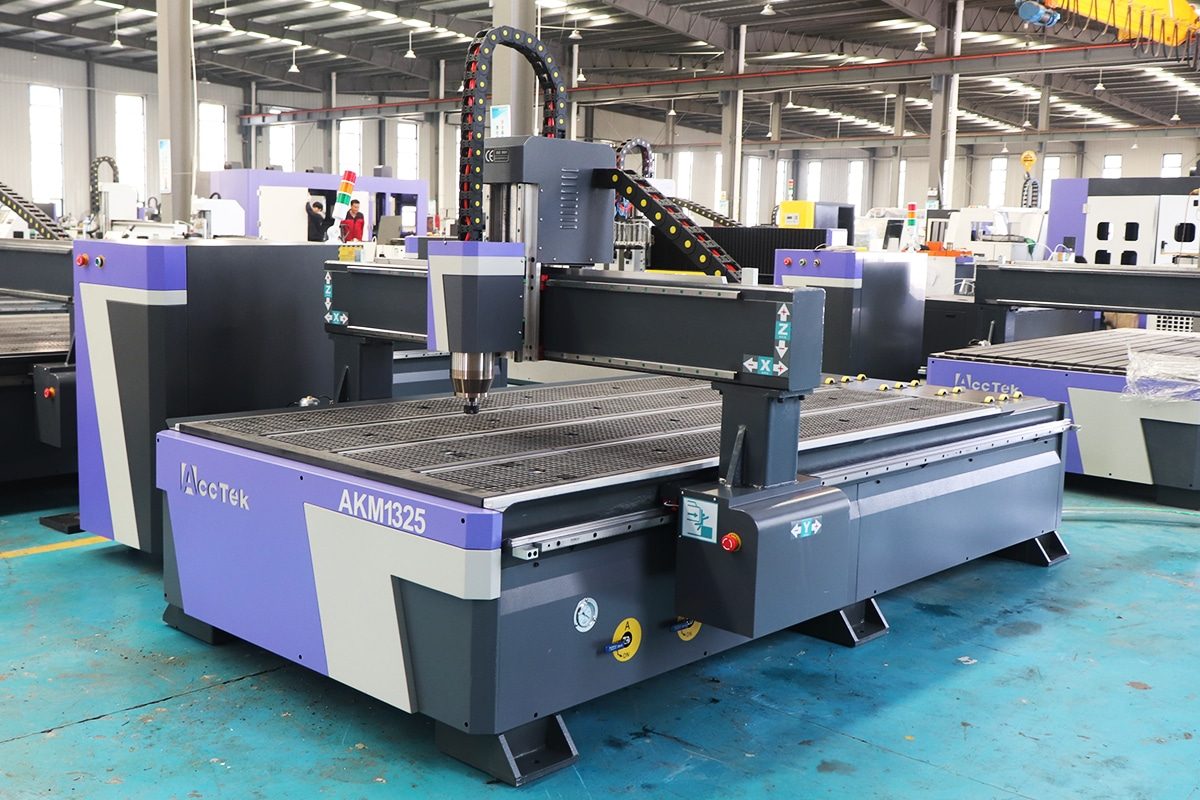
At its most fundamental level, the operation of CNC routers is built on the seamless coordination of controlled motion and controlled cutting. These two principles work together to convert digital design data into precise physical results. Controlled motion ensures that the cutting tool moves to the correct position at the correct time, following an exact path defined by software. Controlled cutting ensures that, as the tool moves, it removes material in a predictable, efficient, and safe manner. If either element is poorly managed, accuracy, surface quality, and tool life are compromised. When both are optimized, CNC routers can deliver repeatable precision across even the most complex designs.
Motion control governs how the CNC router moves its cutting tool through three-dimensional space. Most CNC routers use three linear axes—X, Y, and Z—which allow movement across the table and vertically into the material. The controller reads instructions generated by CAM software and converts them into electrical signals that drive the motors.
Stepper motors or servo motors move the axes in extremely small increments, often measured in fractions of a millimeter. Mechanical components such as ball screws, lead screws, or rack-and-pinion systems convert motor rotation into linear motion. Acceleration, deceleration, and directional changes are carefully managed to prevent vibration, missed steps, or mechanical stress.
Motion control also includes machine calibration, homing routines, and travel limits. These features establish reference points, ensure positional accuracy, and protect the machine from over-travel. In advanced systems, feedback mechanisms continuously verify that the tool is moving exactly as commanded.
CNC routers operate by precisely synchronizing controlled motion with controlled cutting. Motion control ensures the tool follows the digital design with exact positioning and smooth movement. Cutting control ensures the material is removed correctly, safely, and efficiently. Together, these two systems form the technical foundation of CNC routing, enabling reliable, repeatable, and high-quality machining across a wide range of materials and applications.
When you stand in front of CNC routers, you’re not just looking at a “table with a spinning bit.” You’re looking at a mechanical system designed to do two hard jobs at once: move precisely and resist cutting forces. The machine’s architecture—its frame, the way its axes are arranged, and the size and shape of its usable workspace—determines how accurate it will be, what materials it can handle, how fast it can cut without vibration, and how well it holds calibration over months and years. In practical terms, architecture is the difference between clean edges and chatter marks, square parts and “mystery tapers,” or consistent repeatability and constant re-zeroing.
CNC routers cut by pushing a tool through material. That pushing creates side loads (especially during pocketing and contouring), vertical loads (during plunges and ramping), and dynamic loads (from acceleration and deceleration as the machine changes direction). If the frame and structure can’t resist those loads, the tool won’t stay where the software thinks it is.
A useful way to think about it: the cutting tool is only as accurate as the structure holding it. The controller can command “move 0.10 mm,” but if the machine flexes 0.10 mm under load, that movement never fully reaches the workpiece.
CNC routers’ axis layout describes what moves and what stays still. The most common layouts you’ll see are gantry-style and fixed-bridge (moving-table) designs. Both can be excellent, but they behave differently under load.
A simple rule of thumb: gantry designs tend to maximize workspace and convenience, while fixed-bridge designs tend to maximize rigidity and precision—though high-end machines of either type can be engineered to perform extremely well.
Here’s a common surprise for new CNC users: the “working area” listed on a spec sheet is often an idealized number. What matters in real life is the cutting envelope—the actual area in which your tool can cut the part you want, with your real workholding setup.
A practical mindset: don’t just ask “How big is the bed?” Ask “Can I clamp the part safely and still cut the full perimeter?” That’s the real test of whether a machine fits your projects.
CNC router architecture is the “silent decider” of performance. A stiff frame and structure keep the tool on-path under real cutting forces, which is why stiffness translates directly into accuracy. Axis layout—gantry versus fixed bridge—shapes how loads are handled and how large a workspace you can realistically build without sacrificing rigidity. And finally, travel and working area aren’t the whole story; the real cutting envelope is what you can actually machine once clamps, clearance, tool length, and Z-height are taken into account. When you understand these architectural fundamentals, you can look at CNC routers and quickly judge what they’re built to do—and what they will struggle to do.
The way CNC routers move is defined by their axes, and understanding them is key to understanding what the machine can and cannot do. An axis represents a direction of motion—either linear or rotational—that the machine can control with precision. The number of axes determines how many directions the cutting tool can move or tilt, how complex a shape can be machined in a single setup, and how efficiently material can be removed. While three-axis machines form the backbone of CNC routing, adding rotational axes dramatically expands capability, accuracy, and flexibility.
3-axis CNC routing uses X, Y, and Z linear motion. The X-axis moves the tool left and right, the Y-axis moves it forward and backward, and the Z-axis controls vertical movement into and out of the material. Together, these three axes allow the tool to reach any point within the machine’s working envelope.
This configuration excels at machining flat or prismatic parts. Profiles, pockets, drilled holes, surface facing, engraving, and 2.5D contours are all easily handled. Even shallow 3D shapes, such as relief carvings, can be produced by gradually stepping down in the Z-axis while moving in X and Y.
The main limitation of three-axis routing is tool orientation. The cutting tool always approaches the workpiece from a vertical direction. Features such as undercuts, angled holes, or complex side geometry require multiple setups, manual reorientation of the part, or specialized tooling. Despite these limitations, three-axis machines remain the most widely used due to their simplicity, affordability, and versatility.
A traditional 4th axis adds rotational motion, usually around the X-axis or Y-axis. This axis allows the workpiece to rotate while the tool moves in X, Y, and Z. In many setups, the rotary axis functions like a powered chuck or indexer, turning the material as it is machined.
This capability enables cylindrical machining, such as turning columns, legs, spindles, and round signs. Text, grooves, and patterns can be “wrapped” around curved surfaces without repositioning the part. The 4th axis can operate in two modes: indexing, where it rotates to a fixed angle and stops for cutting, or continuous rotation, where cutting occurs while the part is spinning.
By eliminating repeated re-clamping and manual alignment, a rotary axis improves accuracy and reduces setup time while expanding the range of possible part geometries.
Swing 4-axis routing differs from a rotary workpiece axis. Instead of rotating the material, the tool itself tilts or swings around a single rotational axis. This allows the cutter to approach the material at controlled angles while still moving along X, Y, and Z.
This configuration is particularly useful for machining beveled edges, angled pockets, compound surfaces, and sculpted forms that cannot be reached vertically. Swing 4-axis systems reduce the need for long cutting tools, which improves rigidity and surface finish. They also allow many angled features to be machined in one setup, increasing efficiency without the full complexity of five-axis motion.
Full 5-axis CNC routing adds two rotational axes, allowing the cutting tool to tilt and rotate freely while moving along X, Y, and Z. This enables simultaneous multi-axis movement, where all five axes work together during cutting.
Five-axis machines can reach complex geometry from virtually any angle, making them ideal for deep cavities, organic 3D surfaces, molds, and precision components. Tool orientation can be optimized continuously, reducing cutting forces, improving surface finish, and allowing shorter, stiffer tools. In many cases, an entire part can be machined in a single setup.
The trade-offs are higher machine cost, more advanced CAM software requirements, and increased programming complexity. However, for highly complex or high-precision work, the benefits often outweigh these challenges.
CNC router axes define the machine’s freedom of movement and its machining potential. Three-axis routing handles most flat and moderately contoured work. Adding a rotary 4th axis enables cylindrical machining and wrapped features. Swing 4-axis systems allow angled tool access for complex surfaces. Full 5-axis routing delivers maximum flexibility, precision, and efficiency for advanced geometry. Understanding these axis configurations helps match the right machine to the right application.
When CNC routers follow a programmed toolpath, the accuracy you see on the finished part is the result of a carefully engineered motion system working behind the scenes. Motion components are responsible for converting digital commands into smooth, controlled, and repeatable physical movement—often while resisting significant cutting forces and vibration. This system is made up of linear guides that support and constrain movement, drive mechanisms that translate rotation into linear travel, motors that provide controlled power, and feedback systems that verify position. The performance of each component affects accuracy, speed, surface finish, and long-term reliability.
Linear guides are the elements that physically guide each axis as it moves. Their primary job is to allow motion in one direction while resisting movement in all others. Most professional CNC routers use hardened steel linear rails paired with recirculating ball or roller bearing blocks.
Rolling elements are critical because they drastically reduce friction compared to sliding surfaces. Low friction allows smoother motion, more consistent feed rates, and less heat buildup. At the same time, the bearing blocks are designed to carry loads in multiple directions—vertical loads from the weight of the gantry or spindle, side loads from cutting forces, and twisting moments caused by tool engagement.
The size, spacing, and mounting quality of linear guides matter greatly. Wider rail spacing improves resistance to twisting, while properly machined mounting surfaces ensure straight, parallel motion. Lower-end machines may use V-wheels or plastic bushings, which can work for light-duty tasks but wear faster and allow more deflection under load. In CNC routing, stable linear guidance is essential for accuracy that holds up over time.
The drive system determines how motor rotation becomes linear axis movement, and each option has distinct strengths and limitations.
Ballscrews use a threaded shaft and a nut filled with recirculating balls. This design minimizes friction and backlash, enabling very high positioning accuracy and smooth motion. Ballscrews are ideal for short to medium travel lengths where precision is critical. However, long ballscrews can whip at high speeds, limiting their use on very large machines.
Rack-and-pinion systems use a toothed rack mounted along the axis and a rotating pinion gear driven by the motor. This approach is well-suited to large-format CNC routers because it allows long travel distances without speed limitations. Accuracy depends on gear quality, proper preload, and alignment. Dual-drive rack systems are often used on gantries to prevent racking and maintain square motion.
Belt drives rely on reinforced timing belts and pulleys. They are lightweight, fast, and cost-effective but less rigid than other systems. Belts can stretch slightly under load, reducing accuracy in heavy cutting applications. As a result, they are most common in light-duty or hobby-level CNC routers.
Motors provide the controlled force that moves each axis. Stepper motors operate by moving in fixed increments, making them simple to control and relatively inexpensive. They perform well at low to moderate speeds and are widely used in entry-level and mid-range machines. However, steppers can lose steps under excessive load without providing feedback, which can reduce accuracy.
Servo motors use continuous position feedback to adjust torque and speed in real time. They deliver higher speeds, better acceleration, and consistent torque across a wide range of operating conditions. Servos excel in demanding applications where precision, speed, and reliability are critical, making them common in industrial CNC routers.
Feedback systems close the loop between command and reality. Encoders mounted on motors or directly on the axis report actual position back to the controller. In closed-loop systems, the controller compares the commanded position with the actual position and corrects errors instantly.
This real-time position control improves accuracy, detects faults, prevents cumulative errors, and ensures consistent results during long production runs. Feedback is especially important at higher speeds and under varying cutting loads, where mechanical deflection or slippage might otherwise go unnoticed.
CNC routers’ precision depends on the integrated performance of their motion components. Linear guides provide stable, low-friction support; drive systems determine accuracy, speed, and travel capability; motors supply controlled power; and feedback systems verify and correct position. Together, these elements transform digital instructions into smooth, accurate, and repeatable motion under real cutting conditions.
In CNC routers, the spindle system is the component that actually performs the cutting, making it one of the most critical elements of the entire machine. While motion systems decide where the tool goes, the spindle determines how effectively material is removed, how smooth the cut looks, how long tools last, and how reliably the machine can operate over extended periods. A well-designed spindle system delivers stable rotation, consistent torque, accurate tool holding, and proper thermal control. Even a highly accurate motion platform will underperform if the spindle system is poorly matched to the application.
Entry-level CNC routers often use handheld woodworking routers mounted to the machine. These tools are designed for short, manual cutting sessions and rely on brushed motors and internal fan cooling. While they are inexpensive and widely available, they have limitations in CNC use. Speed control is often coarse, torque drops off significantly at lower RPMs, and brushes wear over time. Noise levels are also high, and vibration can affect surface finish.
Purpose-built CNC spindles are engineered specifically for automated, continuous operation. They typically use brushless motors controlled by a variable frequency drive (VFD), allowing precise and stable speed control across a wide RPM range. CNC spindles are balanced to tighter tolerances, which reduces vibration and improves cut quality. They are designed for long duty cycles, making them far more reliable for production or extended machining sessions.
The collet system connects the cutting tool to the spindle and plays a major role in accuracy and safety. A good collet grips the tool evenly around its circumference, minimizing runout—the slight wobble that can occur if the tool is not perfectly centered. Excessive runout leads to poor surface finish, uneven tool wear, and reduced dimensional accuracy.
CNC spindles use standardized precision collet systems that support a range of tool sizes. Clean collets, correct tightening torque, and proper tool insertion depth are essential practices. Even a high-quality spindle will perform poorly if the tool holding system is neglected.
As spindles operate, they generate heat from both motor losses and cutting loads. Effective cooling is essential to maintain bearing life, dimensional stability, and consistent performance.
Air-cooled spindles use internal fans to move air over the motor and bearings. They are simpler to install and maintain but can be noisier and less effective during long, high-load operation. Water-cooled spindles circulate coolant through the spindle body, maintaining a stable temperature. This improves bearing life, reduces thermal expansion, and significantly lowers operating noise. Water cooling is especially valuable in precision or continuous-duty applications.
The spindle system is truly the heart of CNC router cutting performance. Dedicated CNC spindles outperform handheld routers in stability and durability, spindle power and speed define cutting capability, precision collets ensure accurate tool holding, and effective cooling preserves reliability. Together, these factors determine how efficiently and accurately CNC routers transform rotational motion into clean, controlled material removal.
Cutting tools are the final link between CNC routers and the material being machined. No matter how rigid the machine or how advanced the software, the quality of the finished part ultimately depends on the tool doing the cutting. Tool geometry determines how material is sheared, how chips are formed and evacuated, how much heat is generated, and how much force is transferred into the machine. Understanding cutting tools—bits, end mills, their materials, and the concept of chip load—is essential for achieving clean cuts, accurate dimensions, and reliable tool life in CNC routing.
The material from which a cutting tool is made directly affects sharpness, stiffness, and wear resistance. High-speed steel (HSS) tools are inexpensive and forgiving but dull quickly, especially in abrasive materials.
Solid carbide tools are the standard for CNC routing. Carbide is extremely hard and stiff, allowing higher feed rates, cleaner cuts, and longer tool life. However, carbide is brittle and requires proper feeds and speeds to avoid breakage.
Tool coatings further enhance performance. Titanium-based coatings reduce friction and heat buildup, while advanced diamond or diamond-like coatings excel in abrasive materials such as composites, MDF, and plastics. Coated tools last longer and maintain sharp cutting edges under demanding conditions.
Chip load is the thickness of material removed by each cutting edge on every revolution of the tool. It is a critical factor in cutting performance and is determined by feed rate, spindle speed, and the number of flutes.
Too small a chip load causes the tool to rub instead of cut, generating excessive heat and dulling the edge prematurely. Too large a chip load overloads the tool, increasing cutting forces and risking breakage. Proper chip load creates clean chips, efficient heat removal, and stable cutting forces.
Many cutting problems—burning, chatter, and rapid tool wear—are the result of incorrect chip load rather than poor tooling or machine quality.
CNC routing success depends heavily on cutting tool selection and geometry. Choosing the correct tool type for the job, using high-quality materials and coatings, and maintaining proper chip load allow the CNC router to cut efficiently, cleanly, and consistently. Mastery of cutting tools transforms CNC routers from a moving machine into a precise and reliable manufacturing tool.
When explaining how CNC routers work, it’s easy to focus on motors, spindles, and software—but none of those matter if the material moves during cutting. Workholding is the system that secures the workpiece to the machine and allows cutting forces to be applied predictably and safely. In practice, workholding is one of the biggest determinants of accuracy, surface finish, and repeatability. CNC routers can follow a toolpath perfectly, but if the workpiece shifts by even a fraction of a millimeter, the final part will be inaccurate. This is why experienced operators often say that workholding is half of CNC machining.
During routing, the cutting tool generates forces in multiple directions. Side loads push the material laterally, while the spiral geometry of most tools creates upward or downward lifting forces. Acceleration and deceleration of the machine add additional dynamic loads. Workholding must resist all of these forces simultaneously without allowing the material to slide, lift, vibrate, or flex.
Poor workholding leads to common CNC problems: chatter, inconsistent depths, broken tools, misaligned features, and even dangerous ejections of material. Good workholding, on the other hand, ensures the material stays flat, square, and in the same position from the first cut to the last. It also affects workflow efficiency—fast, repeatable setups reduce downtime and human error, especially in production environments.
Vacuum tables are one of the most popular workholding solutions for CNC routers, particularly for flat sheet goods like plywood, MDF, plastics, and composites. They work by pulling air through a sealed surface, creating a pressure difference that presses the material down evenly across the table.
The major advantage of vacuum workholding is unobstructed cutting access. Since there are no clamps on top of the material, the tool can cut anywhere within the work area. This makes vacuum systems ideal for nested-based manufacturing, where multiple parts are cut from a single sheet.
Vacuum tables often work best when combined with a surfaced spoilboard that improves sealing and flatness.
Mechanical workholding uses physical force to restrain the workpiece. Common methods include edge clamps, cam clamps, toggle clamps, screws, and T-slot systems. These methods provide a strong, localized holding force and are reliable for thick materials, irregular shapes, and parts that do not seal well for a vacuum.
Custom fixtures go a step further by locating the part precisely using pins, stops, or pockets. Fixtures enable repeatable positioning and are essential for multi-operation machining or batch production. The downside is reduced cutting access near clamps and longer setup time compared to vacuum systems. Careful planning is required to avoid tool collisions.
A spoilboard is a sacrificial layer mounted on the CNC router table. Its purpose is to protect the machine bed and serve as a flat reference surface for cutting. Spoilboards allow through-cuts without damaging the table and help distribute the vacuum evenly when used with vacuum systems.
Over time, spoilboards become uneven due to tool marks and wear. Surfacing—lightly machining the spoilboard—restores flatness and ensures it is parallel to the machine’s axis motion. A flat spoilboard is critical for consistent cutting depths, especially when machining thin materials or performing precision pocketing.
Workholding is a foundational part of how CNC routers work. Effective workholding resists cutting forces, maintains accuracy, and ensures safety. Vacuum tables provide fast, unobstructed holding for flat parts, mechanical clamps and fixtures offer strength and flexibility for complex shapes, and spoilboards support all methods by providing a flat, sacrificial reference surface. Mastering workholding turns CNC routing from controlled motion into reliable, repeatable machining.
The control system is what turns CNC routers from a mechanical platform into an intelligent, automated machine. Often referred to as the “brain,” this system interprets digital instructions, plans precise motion, coordinates motors and drives, and continuously monitors machine status. Every move the CNC router makes—from a rapid positioning move to a delicate finishing pass—is calculated and executed by the control system. Accuracy, smoothness, repeatability, and safety all depend on how well this system integrates software, electronics, and machine hardware.
At the center of the control system is the controller, which may be a dedicated industrial unit or a PC-based system paired with motion-control hardware. The controller reads CNC programs written in G-code, which define toolpaths, speeds, feeds, and machine actions. However, the controller does far more than simply follow instructions line by line.
Through motion planning, the controller calculates how each axis should move to follow the toolpath smoothly and accurately. This includes coordinating multiple axes simultaneously, managing acceleration and deceleration to prevent vibration, and maintaining consistent feed rates through curves and corners. Advanced motion planning reduces mechanical stress, improves surface finish, and allows higher cutting speeds without sacrificing accuracy.
The controller sends commands to motor drives, which regulate electrical power to the motors. Drives control current, voltage, and timing to achieve the desired speed and torque. In servo systems, drives also process feedback from encoders and make real-time corrections. The quality of the controller–drive interaction directly affects responsiveness, smoothness, and positional accuracy.
For precise operation, the CNC router must always know its position. Limit switches are physical sensors placed at the ends of the axis travel to prevent the machine from moving beyond safe mechanical limits. If triggered during normal operation, they immediately stop motion to protect the machine.
At startup, the machine performs a homing sequence, moving each axis until it contacts a designated reference switch. This establishes a known zero point from which all movements are measured. Homing ensures repeatability between power cycles and enables accurate positioning across the entire working envelope.
Once homed, the controller enforces soft limits, which are software-defined boundaries based on known axis travel. Soft limits prevent commands that would exceed safe motion before the machine ever reaches a physical stop, allowing smoother and safer operation.
Safety is a core responsibility of the control system. Emergency stop circuits immediately cut power to motion components in dangerous situations. The controller also monitors for faults such as motor overloads, position errors, communication failures, or unexpected motion.
Additional safety features may include door interlocks, spindle enable checks, and grounding and shielding to prevent electrical hazards. These systems protect both the operator and the machine, ensuring reliable operation even in demanding environments.
The control system is the CNC router’s brain, responsible for interpreting programs, planning motion, coordinating drives, tracking position, and enforcing safety. Through intelligent motion planning, reliable homing and limit management, and robust safety systems, the control system enables precise, repeatable, and safe CNC routing under real-world conditions.
Although CNC routers are physical machines, it is the software workflow that truly defines how they operate. This digital process transforms a concept into a precisely machined part by converting design intent into controlled machine motion. The workflow links creativity, engineering, and manufacturing into a single chain: design the geometry, plan how it will be cut, translate those plans for a specific machine, and execute them as coordinated motion. Understanding this software pipeline is essential because errors or decisions made early in the process directly affect accuracy, efficiency, and final part quality.
The workflow begins with CAD (Computer-Aided Design) software, where the part exists purely as digital geometry. In CAD, the designer defines the shape, size, and features of the part, including profiles, holes, pockets, contours, and reference points. Designs may be simple 2D drawings for flat parts, 2.5D models with varying depths, or full 3D models for sculpted or organic forms.
Precision at this stage is critical. The CNC router will reproduce the CAD geometry exactly, so incorrect dimensions, misaligned features, or poorly defined curves will translate directly into physical errors. Good CAD practice includes using clean geometry, fully constrained sketches, logical layer organization, and consistent units. For CNC work, designers also think ahead about how the part will be held, machined, and referenced.
Once the design is complete, it is imported into CAM (Computer-Aided Manufacturing) software. CAM does not change the design; instead, it determines how the CNC router will make it. This is where machining decisions are made.
In CAM, the user selects cutting tools, defines spindle speeds and feed rates, chooses cutting strategies, and sets depths of cut and step-over values. The software then calculates toolpaths—the precise paths the cutter will follow through space. These toolpaths account for tool diameter, material removal, entry and exit moves, and safe clearance heights to avoid collisions.
CAM planning balances multiple factors: cutting time, surface finish, tool life, and machine capability. Efficient toolpaths reduce unnecessary motion, minimize tool wear, and produce consistent results.
The toolpaths generated in CAM are still abstract instructions. Post-processing converts them into a format the CNC router’s controller can understand. Each CNC controller has its own dialect, with specific command formats, coordinate conventions, and supported functions.
The post-processor inserts the correct syntax, units, tool change commands, spindle control instructions, and safety moves. Choosing the correct post-processor is critical—an incorrect one can result in unexpected motion, incorrect scaling, or machine errors.
The final output of the workflow is G-code, the standard programming language of CNC machines. G-code commands tell the machine where to move, how fast to move, when to start or stop the spindle, and when to change tools. Each line represents a specific instruction, and together they form a complete machining sequence.
Although modern users rarely write G-code by hand, understanding its basics helps with troubleshooting, optimization, and safe operation.
The software workflow is the digital backbone of CNC routing. CAD defines the part, CAM plans how it will be machined, post-processing adapts those plans to the specific machine, and G-code communicates the instructions to the controller. Together, these steps turn ideas into accurate, repeatable, and fully automated CNC cuts.
For CNC routers to cut parts accurately and repeatably, they must always know their exact position in three-dimensional space. Coordinate systems provide the mathematical framework that connects digital toolpaths to physical movement. Every move the router makes—whether a rapid positioning move or a precise cutting pass—is calculated relative to defined coordinate references. Understanding how machine coordinates, work coordinates, zeroing, and tool offsets interact is essential for understanding how CNC routers maintain accuracy across different setups, tools, and jobs.
The machine coordinate system is the CNC router’s absolute reference frame. It is established during the homing process, when each axis moves to a fixed physical reference point, such as a limit or home switch. Once homed, the machine knows the exact limits of its travel and assigns every position a value relative to this permanent origin. Machine coordinates do not change during normal operation and are used internally for safety, soft limits, and motion planning.
In contrast, work coordinates define where the part is located on the table. Instead of forcing the user to place every part at the same physical location, the controller allows one or more work coordinate systems to be defined. By setting a work zero point—often a corner, edge, or center of the material—the user aligns the digital design with the real workpiece. This flexibility allows the same program to be reused across different setups by simply redefining the work origin.
Zeroing establishes the reference point from which cutting depths and positions are measured. While X and Y zero determine horizontal alignment, Z zero is especially critical because it controls how deeply the tool cuts into the material.
Z zero can be set on the top surface of the material, on the spoilboard, or on a fixture surface, depending on the machining strategy. Setting Z zero on the material top ensures consistent depth relative to material thickness, while setting it on the table or fixture ensures consistent absolute depth across multiple parts. Even small Z errors can lead to incomplete cuts, excessive tool wear, or damage to the spoilboard.
Coordinate systems allow CNC routers to understand position and depth with precision. Machine coordinates provide a fixed internal reference, work coordinates align programs to real-world setups, zeroing establishes accurate starting points, and tool length offsets keep multiple tools synchronized. Together, these systems enable precise, repeatable CNC routing across varied jobs and setups.
CNC routers remove material by spinning a cutting tool at high speed and moving it through the workpiece along a programmed path. But the quality of that material removal depends on a handful of tightly connected variables: cutting forces, tool deflection, heat generation, and how much of the tool is engaged in the material at any moment. In other words, cutting is not just “spinning faster” or “moving slower.” It’s a controlled process that aims to create stable chips, keep forces predictable, and avoid overheating the tool or material. When those conditions are met, you get clean edges, accurate dimensions, and long tool life. When they aren’t, the results show up immediately as chatter, tear-out, burning, melting, or broken bits.
Whenever the tool touches material, it experiences resistance. That resistance becomes cutting force, and it acts in directions that matter: sideways (pushing the tool off the path), upward or downward (trying to lift the workpiece or pull it into the cut), and torsional (twisting load on the tool and spindle).
A common strategy to control deflection is to separate machining into roughing and finishing. Roughing removes most material quickly, even if the walls are not perfectly clean. A finishing pass then removes a thin layer with lower cutting force, improving accuracy and surface finish because the tool is less likely to bend.
This is why chip load matters so much: it links feed and RPM to the actual “bite” each cutting edge takes. When the chip load is in a healthy range, the cut sounds steadier, chips look consistent, and the tool runs cooler.
Most CAM workflows use heavier engagement for roughing (efficient material removal) and lighter engagement for finishing (accuracy and smoothness). A typical pattern is: clear material with a pocketing strategy, leave a small amount of stock on walls, then do a finishing contour pass to bring walls to the final size.
Good entry/exit moves also reduce the chance of leaving a “divot” where the tool begins, which is important for visible surfaces like signs, furniture parts, and decorative panels.
Material removal in CNC routing is a controlled cutting process, not just a fast-spinning tool. Cutting forces must be managed to prevent deflection and vibration. Feed rate and RPM must be matched to form proper chips that carry heat away. Stepdown and stepover control how aggressively the tool engages the material, balancing speed with stability and finish. Finally, smart entry and exit techniques like ramping, helical moves, and lead-ins reduce tool shock and leave cleaner edges. Mastering these fundamentals is what enables CNC routers to produce accurate, repeatable, high-quality parts across many different materials.
CNC routers are popular because they’re versatile—they can cut everything from softwood signs to aluminum brackets. But different materials don’t just “cut differently.” They fail differently, heat up differently, and react to tool geometry in their own ways. Wood can tear and splinter, engineered panels can chip or produce extreme dust, plastics can melt or crack, composites can destroy tools and create hazardous fibers, and aluminum can grab the cutter if chips aren’t cleared. CNC routers will faithfully follow the same toolpath in any material, but the outcome depends on choosing the right tool, chip load, cutting strategy, and workholding for that material’s behavior.
Plastics can be deceptively difficult because the main enemy is often heat. Many plastics soften and smear if the tool rubs instead of producing chips. The goal is to create clean chips that carry heat away.
Material choice changes everything about CNC routing—tool selection, chip load targets, cutting strategy, and even dust control. Wood and plywood demand tear-out management and attention to grain and glue layers. MDF and particle board cut consistently but are abrasive and dusty, requiring strong extraction and durable tools. Plastics require heat control and chip evacuation to avoid melting, smearing, or cracking. Composites are highly abrasive and produce hazardous dust, making tooling and filtration essential. Aluminum and light metals require rigidity, excellent chip clearing, and conservative engagement to prevent chatter and tool failure. Matching the process to the material is what turns “it can cut it” into “it cuts it well.”
When people talk about CNC router “quality,” they are usually reacting to three related but distinct outcomes: accuracy, repeatability, and surface finish. These qualities don’t come from a single component or setting. Instead, they emerge from the combined behavior of the machine’s structure, motion system, spindle, tooling, workholding, software, and setup practices. CNC routers may move exactly as programmed, yet still produce poor results if forces, alignment, or calibration are off. Understanding what truly determines quality helps explain why careful setup and maintenance often matter as much as machine size or power.
Accuracy refers to how close the finished part is to the intended dimensions and geometry defined in the design. If a slot is designed to be 10.00 mm wide and measures 10.02 mm, the machine is slightly inaccurate. Accuracy is influenced by calibration, tool deflection, machine stiffness, thermal effects, and how well the coordinate system and offsets are set.
Repeatability describes how consistently the machine returns to the same position or produces the same result. CNC routers might cut that same slot at 10.02 mm every time. In that case, it is highly repeatable but not perfectly accurate. This distinction matters because repeatability is often more valuable in production work. A repeatable machine can be calibrated or compensated in software to improve accuracy. A machine that lacks repeatability produces inconsistent parts that are difficult or impossible to correct.
High-quality CNC routing depends on both repeatability, which provides consistency, and accuracy, ensuring that consistency matches the design intent.
Errors in CNC routing come from many small contributors rather than one large failure. Mechanical deflection is one of the most common sources. Cutting forces can bend tools, flex gantries, or twist frames slightly, especially during aggressive cuts or with long, small-diameter tools. Even small deflections show up as dimensional variation or tapered walls.
Backlash and compliance in drive systems can cause positional errors during direction changes. While modern systems reduce backlash significantly, wear, loose components, or poor tuning can reintroduce it over time. Thermal effects also matter—spindle heat, motor heat, and ambient temperature changes can cause components to expand, subtly shifting dimensions during long runs.
Tool-related factors play a major role in surface finish and accuracy. Dull tools, excessive runout, poor collet condition, or long tool stick-out increase vibration and leave visible tool marks. Workholding errors, such as material lifting, flexing, or shifting, often masquerade as machine inaccuracy even when the machine itself is performing well.
Finally, software and setup errors—incorrect tool diameter values, improper offsets, poor CAM strategies, or inconsistent zeroing—can introduce systematic inaccuracies that repeat perfectly but produce the wrong result.
Tramming is the process of aligning the spindle so that it is perfectly perpendicular to the machine table. If the spindle is tilted even slightly, facing and pocketing operations will leave uneven surfaces, visible ridges, or inconsistent depths across a part. Tramming directly affects surface finish and flatness, especially on large or surfaced areas.
Squaring ensures that the machine’s axes are truly perpendicular to one another. If the gantry is not square to the table travel, rectangular parts may come out as parallelograms, and dimensions can vary depending on the cutting direction. Squaring errors also affect how well parts fit together in assemblies.
Neither tramming nor squaring are not “set once and forget” adjustment. Machine movement, transport, temperature changes, and wear can slowly affect alignment. Regular checks and adjustments are part of maintaining CNC quality.
CNC router quality is defined by how accuracy, repeatability, and surface finish work together. Accuracy determines how closely parts match the design, repeatability ensures consistency from part to part, and surface finish reflects cutting stability, tool condition, and alignment. Mechanical deflection, thermal effects, tooling, workholding, and software settings all contribute to error. Proper tramming and squaring align the machine’s geometry so that precision is even possible. When these factors are controlled, CNC routers deliver reliable, professional-quality results—not just motion, but true precision.
CNC routers work by combining precise mechanical motion, controlled cutting, and intelligent software into a single automated system that can transform digital designs into physical parts with speed and consistency. At a high level, the process begins with software—CAD defines the geometry, CAM plans how the material will be cut, and G-code communicates those instructions to the machine. The control system then interprets this code, plans smooth motion, and coordinates motors, drives, and safety systems to move the cutting tool accurately through space.
Mechanically, the router relies on a rigid frame, carefully designed axis layout, linear guides, drive systems, and motors to ensure accurate and repeatable movement. The spindle system provides controlled rotational power, while cutting tools and their geometry determine how material is actually removed. Workholding keeps the material stable, and coordinate systems ensure the machine always knows where it is relative to the workpiece and the tool.
Successful CNC routing depends on managing cutting forces, heat, tool engagement, and material-specific behavior. Accuracy, repeatability, and surface finish are shaped by machine stiffness, calibration, tooling, alignment, and setup practices. When all these elements work together, CNC routers become far more than a cutting machine—it becomes a reliable, flexible manufacturing tool capable of producing precise, high-quality parts across a wide range of materials.